
Color Picker Enhancements: Palette and Kelvin support
First-time poster, here.
While I'm not the first person to propose color picker changes in this forum, I do feel that -- while the current Blender color picker is adequate -- a couple of additional features would increase functionality and workflows, and wouldn't be too difficult to add. Might be a good consideration for Blender 2.8xxx
I would like to see the following additions:
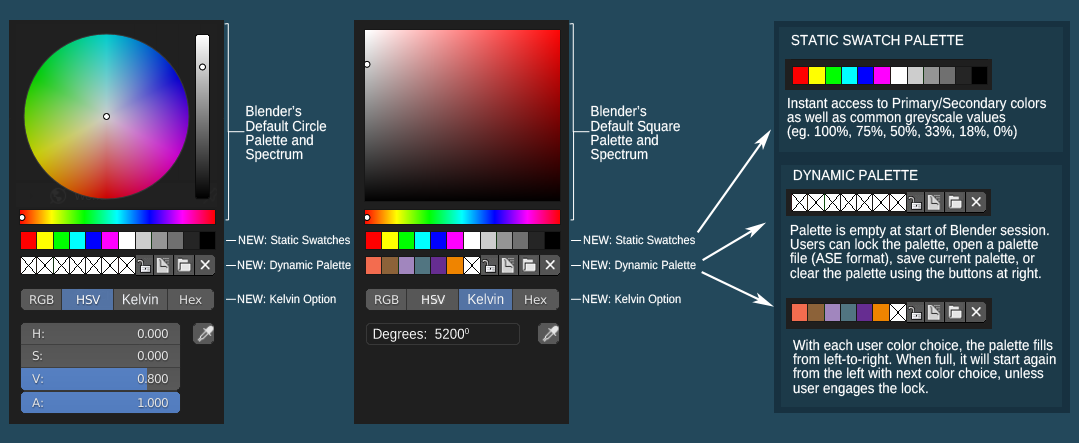
- a set of static swatches for primary colors, secondary colors, and common grayscale values.
- another palette of dynamic swatches that update to reflect colors chosen during a given Blender session, similar to Maya's color picker swatches. This palette can be locked, imported, exported and cleared, and would support Adobe's ASE format for sharing palettes and swatch collections.
- support for entering blackbody color temperature values in degrees Kelvin. This would be similar to the "Hex" option in that the UI would switch to a single text field input, in this case for temperatures instead of hexidecimal values.
I had hoped to embed my mockup, but am new to this forum and don't know how. I've included a link to my mockup below, and will add the mockup as a custom thumbnail to see if that makes it show up in the post.
Thanks for reading. Cheers!
drive.google.com/file/d/1c81mzq2Bhs-Glyc7mIaC8PiqCm_B4GJm/view
4 Comments
Nice additions to the colorpicker. Maybe there could be a toggle/switch for gamma correction (sRGB vs linear) to input correct RGB values, too?
Is there an add-on for this?
I'd also consider this featuer super useful. The Color list should not only save the color values but also additionally a descriptive name, I think. In that way you could either use the swatches next to each other or scroll through a searchable list with names. If the user is for example working in a company with a color palaette that uses names this is for sure a very welcome feature. BEtter than copy/pasting or sampling color values from somewhere. Also much more performant when the library grows really large.
Awesome, the image shows up in the post. Have at it!