
Curve editor is dangerously close to the Slider
Often when i'm editing the last point of a curve i'll accidentally scroll up the entire window. Cause my mouse is 1 pixel too much to the right
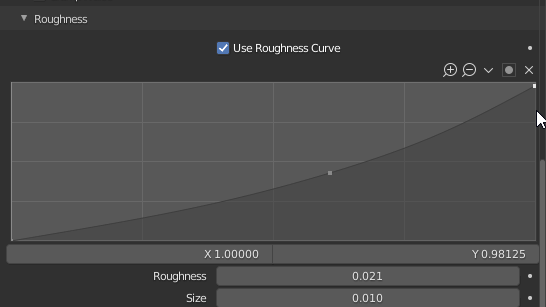
Often when i'm editing the last point of a curve i'll accidentally scroll up the entire window. Cause my mouse is 1 pixel too much to the right
4 Comments
Personally, I think most of the issues we have with the scroll bars are since they made them overlap the UI and display on hover only.
Thanks to that change, we have lots of situations where the scroll bar is too close from other elements for safe clicking or simply for nice visibility, and we also lose one of the interest of a scroll bar: the scrolling progression obtainable at a glance.
I think this change was made so to not clutter the UI, make it lighter, and earn some space. But it actually makes things messier and less handy. It wasn't taking much space in the first place, making it hide doesn't mean you can take that space.
Good point, I think this observation could be very beneficial for this task Harley is working on: developer.blender.org/D6505 , maybe you could poke him there and share this with him.
* @slowk1d * I've mentioned it on the thread now
Literally every program has Floating Curve Editor and Floating ColorRamp for this issues. Except Blender.