
Grease Pencil - Improve handling of pressure changes while stylus is stationary
The Problem
There's a problem with the way Blender handles changing stylus pressure while the stylus isn't moving across the tablet/screen. This is particularly noticeable when you try to:
- Draw a stroke with variable thickness
- Have the start of the stroke be relatively thick
Here's an image illustrating the problem:

Notice the beginning of the strokes. They all have an unwanted point. They're not round like the stroke ends are.
Here's roughly how pen pressure and speed are varying during a stroke:

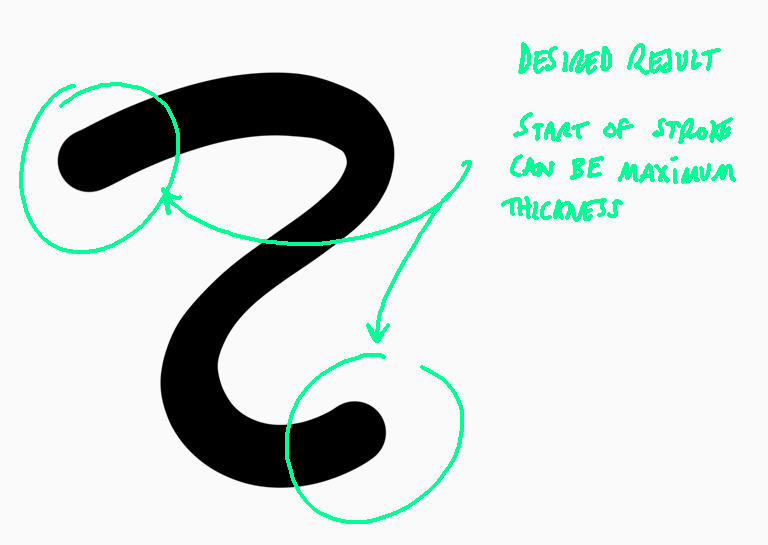
Here's an image (created in another drawing app) illustrating what I'd like to be able to draw in blender:

(My guess about) Why the problem happens
The first moment the pen touches the tablet/screen, the related pressure is inevitably low. Blender creates the first vertex with this low-thickness value. You increase pen pressure without moving the stylus laterally to try to get the desired starting thickness for the stroke, but Blender doesn't record the change since no lateral pen motion has happened. Blender only records a new vertex and thickness once a minimum distance has been travelled by the pen tip.
How the problem could be fixed
Sometimes the pen will be stationary at the location of an existing vertex in the stroke currently being created. Under this condition, Blender monitors the pen pressure. If the pressure/thickness is detected to be higher than that of the already-recorded vertex, the thickness of that vertex is updated with the new pressure/thickness.
2 Comments
man, sometimes you don't realise you have a problem until someone else points it out. This is exactly one of these times, wish I could upvote twice
Between home and work I have 4 Pen. Take a look at this comparasion: snipboard.io/ckvWOD.jpg