
Strip´s own Icons & Names!
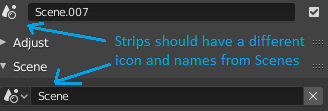
I was thinking, wouldn´t it be better if the strips had their own icon in the sidebar region of video sequencer timeline editor? And also they should be named "strip xxxx" instead of "scene xxxx", all of tht to avoid confusion.
3 Comments
That icon is used within the Active Strip Properties panel i the sidebar and in the Add menu. The icon is illustrating a scene. The actual strip added, when adding a scene strip, is a strip showing the contents of that scene, either from the sequencer, the current view or a selected camera.
Since it is actually displaying material from a scene(different from the current scene), it should be referring with a scene icon for that strip type. And since it is, in your case, located in the Active Strip Properties panel there should not be any confusion between this and the global scene selector in the Blender.
Concerning the naming, you'll need to know what scene it is referring to, but you can rename the strip either using the ui or use F2.
* @ tintwotin * I understand that the icon on the first line is indicating that the current strip is a scene, strip, but it´s still visually a little misleading to have both scene icons showing up so closely like that : / Maybe having a "strip + type of strip" icons in the top could be less confusing for newcomers. And about the name, yes we can rename anything inside blender, but maybe it would be better if strips were already called "strip xxx" by default.
* @ogat.ramastef * Since the tab is called Strip it would be redundant to call elements inside that panel Strip...something too.