
File -> New -> Empty Scene
This is a very simple proposal: add another preset to the File -> New menu which is a completely empty scene with no camera, lamp, or default cube.
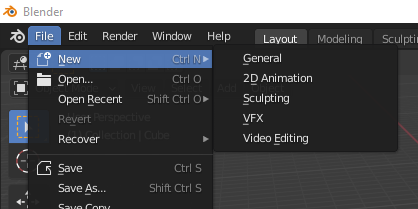
This is a very simple proposal: add another preset to the File -> New menu which is a completely empty scene with no camera, lamp, or default cube.
1 Comment
You can do that yourself, but it's a bit fiddly.
Empty SceneEmpty Scenedirectory.Empty Scenezipfile and install.When you next start up blender you will have your "Empty Scene" Menu item. The nice thing is whatever else you want to change, if you "save startup file" or "save preferences" while in that template it applies only to your template.
For example I have a "3D Printing" application Template which has the units set to millimeters and a wireframe build volume etc. without having to mess with my "General" template.