
Images. details, original path, etc etc
Hello
I'd like to ask if it would be possible to store original image path location inside Images.
I've recently copied some data from 1 blender scene to another via
path = "C:\\Users\\Master\\Desktop\\01_blend_2Mats.blend"

with bpy.data.libraries.load(path, link=link) as (data_from, data_to):
    for w in data_from.worlds:
        myW.append(w)
    data_to.worlds = myW

for wrd in myW:
    w = bpy.data.worlds[wrd.name]
    tree = w.node_tree
    if "Environment Texture" in tree.nodes:
        env = tree.nodes["Environment Texture"]
        envi = self.getNodeByName("Environment Texture")
        if envi != None:
            envi.image = env.image ## asigning imported image - it will have incorrect path and no way of recovery after this function ends.
for world in bpy.data.worlds:
    if "World" != world.name:
        bpy.data.worlds.remove(world)
And my newly assigned image is missing path and there is no way of recovering the path(that I know off). It would be great if image node would hold original path so that we can recover it in future.
Edit, seems like formating is broken : / how to format it here?
Side note, I'm checking blender from production/studio angle to see how viable it is. From the tests I did so far this is quite a bit of an issue. As not being able to re-patch 20000 textures/assets would not allow us to use blender.
2 Comments
Have you tried to pack the files? They will be included in the blender file. On a different computer you may test to unpack using the original folder and it will recreate the entire structure. And you'll see it in the image path!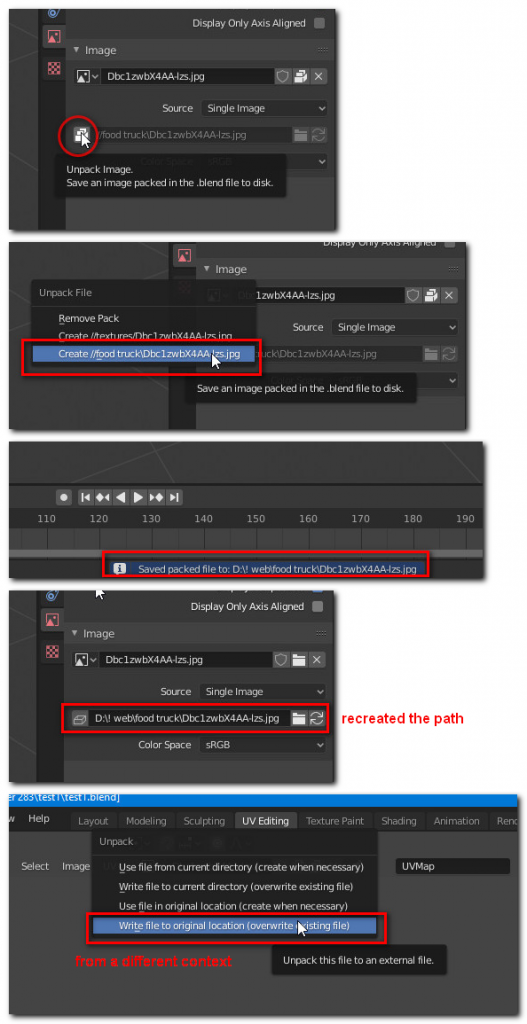
* @florinf * Hello, Thank you for the suggestion. This will not work for large projects in studios. The file path management needs improvement if any studio is to touch blender for production I'm afraid. When it comes to TB of data and textures, libraries, multiple projects, server and failures over the time... blender has to store the original path of the image in a file and I need to be able to click on it in blender.file outliner and see where the original texture was pointing to. Or get access to it via python. Original path has to be stored. Elsewhen failures happen and we have to migrate/update the project . We have no way of linking textures then. We can NOT save textures with blender files. As nice as it is, very few studios will do that/consider that.