
Lightgroups for Cycles (as in Luxrender and Maxwell)
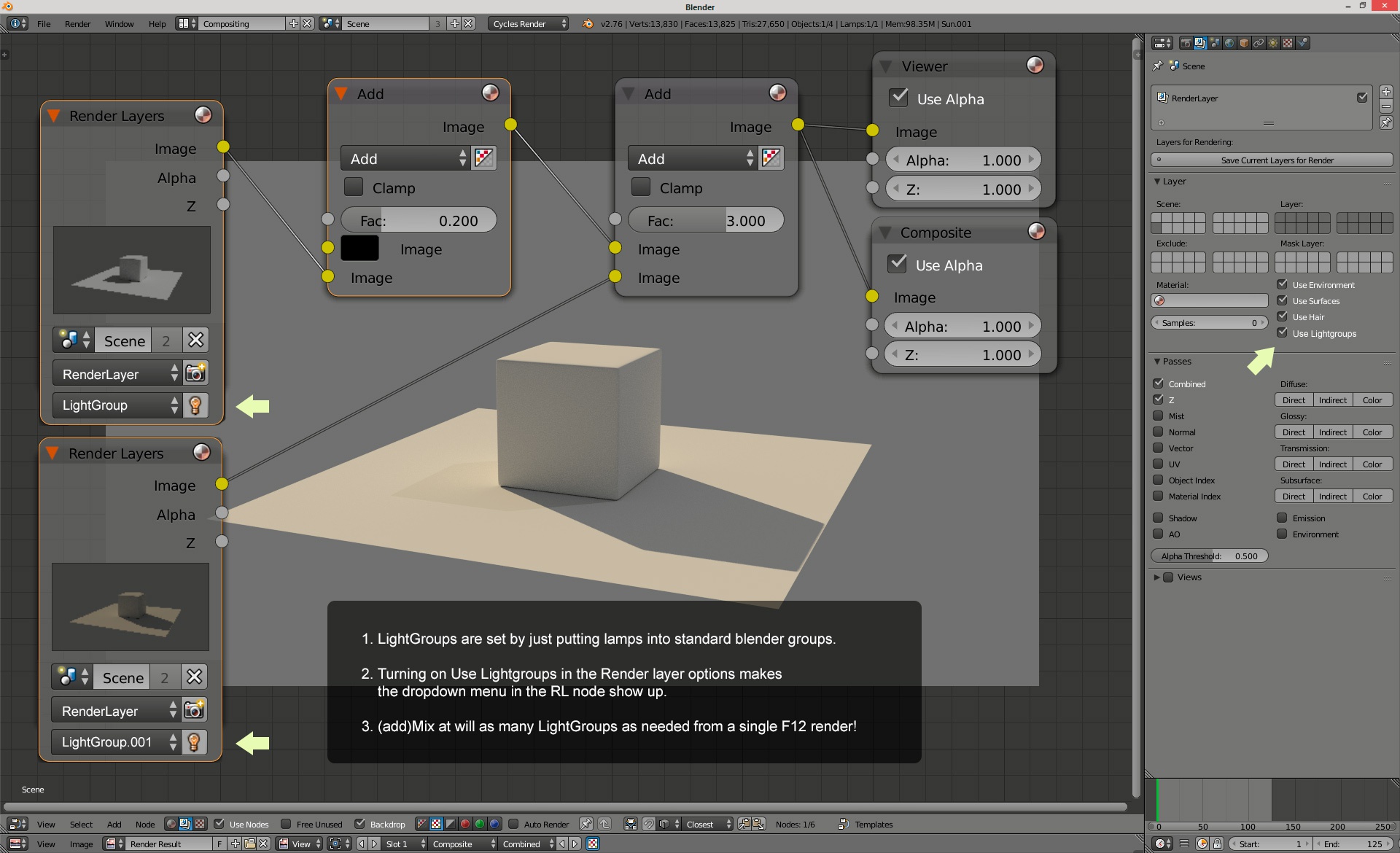
This an old one. The ability to have multiple light rigs <strong><em>in one single render</em></strong>, and tweak them later in post.Can be used also to experiment different light setups in pre-stage. **_edit:_** here is a use case: in the example (pic below), given I am comfortable with the result, I could then go to my scene and set the lamps in the first group to 1/5 of the power, and those from the second 3 times stronger. Then I'll have my lighting looking as i want for a correct F12 render. On a second thought, a more elegant way to expose this in the UI might be two sliders under the lightgroup dropdown: 1 for multiplier, and 1 for light color (or at least white balance/color temperature).
6 Comments
The advantage of this feature over render layers is speed - if you want one layer with both lamps A and B and one only with A, you could get both of them at the same speed as just rendering the first one (maybe 1-2sec more). Meanwhile, to get the result with Render Layers, you'd have to render twice as long.
Currently, the main limitation here is the way render passes are handled, which would need to be rewritten to allow user-defined passes. However, that will have to happen anyways (since the pass flag is running out of bits), and with decent pass handling, adding Light Groups wouldn't be too hard.
Would be great to have this feature in Cycles .. even when almost all the others render engines have it (luxcore, E-Cycles, Bone-Studio build )
lukas, as always you bring me/us nice news! :) @gregzzmail & 3Descape as lukas said, lightgroups, known as multilight in maxwell render, provide multiple images (one for each lightgroup) in one single render. Then usually one can tweak the power and color of lights in postpro: yes, after rendering! The typical scenario is interior rendering with external/internal lights. You can even make an animation out of it! But as I stated it can be great for Lighting studies and planning: set as many light/lightgroups as you want then make 1 render and tweak all the mix nodes to balance the overall lighting. Then you can port the result of this experimenting into the actual scene, giving the needed power to all the lights... For further understanding please watch these videos, keeping in mind that they are post-pro of a single render [youtube.com/watch] [youtube.com/watch]
Hi, maybe you try to explain what advantages this would give us, so that people who don't know luxrender can follow along, without having to do a research by themself.
Here's an example of how Light Groups currently work in Blender with LuxRender: (uploaded on onedrive) onedrive.live.com/redir
They are really useful, and similar functions are all that would be needed.
How is this different from having multiple render layers?