
Mouse Wheel Scroll Action
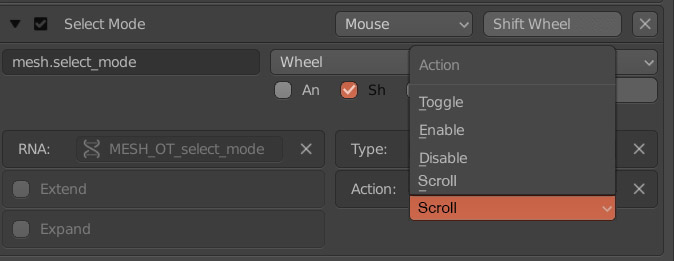
This is not possible and I always wanted to hold shift and move my mouse wheel to scroll between all 3 select mode options (Vertex, Edge, Face). This new function could let you scroll between other stuff. Maybe there are many more uses. It would really speed things up in any workflow. I believe this could be very useful if you want to scroll through tools too like brushes etc...
32 Comments
Select mode could be easly done with python.
@Pawel Piotrowski: Care to explain?
@luisburdallo: I can verify that it can be easily done in Python. One of my big gripes when I switched from modo is how many clicks it takes to get into a specific edit mode, so I wrote a handful of operators to immediately switch to edit mode and then jump into the specified element type. These, of course, can be bound to hotkeys and activated from object mode or edit mode. Once it can be bound to a hotkey, shift+scrollwheel is trivial.
I agree that it would be great for some kind of native way to immediately enter a specific type of element mode from object mode, but for the time being it's not hard to do in Python.
@eldee.smith: Not entirely sure if I did explain the proposal clearly but it this is about the mouse wheel and scrolling through many several options in order to avoid keys as that is easily customizable. Think of this as when scrolling through weapons in any FPS game. How would python add that functionality directly in Blender keymap options in order to set it up to your liking?
@Pawel Piotrowski:
pastebin.com/mXccnsGX
@luisburdallo: But yea, I agre with You that cycling throug different values/modes/brushes could be implemented into input editor.
@luisburdallo: BTW2 i prefer single key for each mode (1-verts, 2-edges, 3-faces). With 3 modes and scroll you must think (for fraction of a second, but still) in which mode you are in.
setup as addon: github.com/Pullusb/SB_1234Select
@Pawel Piotrowski: Does this work for 2.79? Just tried and it does not for me.
@Pawel Piotrowski: Yes I think having this option available will open up lots of new ways of switching many options. Its all about experimentation and flexibility.
@Pawel Piotrowski: To me visually it tells me if I am in any mode so it's just a matter of scrolling once or twice. Not a big deal for me as its so fast that even if you miss it once you scroll again very fast once you are used to it. For me missing a key and having to undo many times because there are too many shortcuts it's even worse.
@luisburdallo: Yea, but i didn't registerey keymaps in addon.
Here You have version with registered keys as shift+scroll:
@Pawel Piotrowski: A million thanks for sharing that. It works now. Now we only need someone to actually code into Blender so it can extrapolate to any other tools and options.
@Pawel Piotrowski: It seems to be working but it stops suddenly sometimes for whatever reason and I have to go out of edit mode and back in. Maybe its caused by another addon I am using for selections but I will have to test things out without the addon another day.
@luisburdallo: Maybe you have another shortcut assigned to that keys?
@Pawel Piotrowski: Yes I think is some kind of conflict with Smart Select Addon as it has some wheel modifiers. Will see if I can change the shift wheel from the addon to ALT or something.
@Pawel Piotrowski: Would it be hard to make this work in 2.8 for time being? I would really appreciate that as I am now trying to get more work done in the new version.
@luisburdallo: I guess not, its super simple, so its only API change. I'll do that when ill have spare time.
@Pawel Piotrowski: Appreciated.
@luisburdallo: Just change addon's blender version to
@Pawel Piotrowski: It does scroll through the icons but the actual selection doesn't change. Very weird. It seems you got to click or move the mouse to visualize the changes. Not great. What do you think about that? Using a key to scroll through using the Pie Menus Addon does change the selection visually.
@luisburdallo: Oh.
Download (save as)
@Pawel Piotrowski: A million thanks mate!
Exactly. Hype this one!!! + 50 in one day.
Not sure about this one! When I model and I want to select an edge or vert or face, I want to switch with precision. I know it's going to annoy me to death if I mind my scrolling to get the right one.
@theobairon16: I've been using it for a while but only I could make it work with toggle between two of them. I had face in another key. Being only 3 modes its easy to remember that after vertices are edges so for faces you do two steps scrolling. Like many things, it's about taste and how your mind works. For me having to rely on so many keys makes it pretty bad as you sometimes have to look at your keyboard or press the wrong key and that slows you down too. I currently have views mapped to numbers 1-5 instead of selection mode. It works better for me and my workflow, not asking to change the current mode keys. As I said it would be useful for some other stuff. It's about flexibility.
Right now you only have a toggle function for brushes so I propose having a scroll function so you can move to next or previous in a list of modes/tools.
@luisburdallo: I've made test and brush scrolling looks dumb for me. You would need to scroll thgough all brushes to find needed one instead of single key/pie stroke/selection from list/2.8 toolshelf.
@Pawel Piotrowski: Well I said that just cause it came to mind but I think the wheel could be available for other things. Probably a pie menu would work better for selecting brushes for sure. How about using it to move value up/down like brush radius, strength or whatever we could think of. That is just thinking about the painting/sculpting tools but Blender is massive. I think the scroll wheel should be available so there are more possibilities and much more flexibility when deciding how your workflow should be like.
As Pawel mentioned, this can be easily done in Python- but I'll do one better and share my Python operator that enables similar functionality:
pastebin.com/apW4HiLX
Obviously that's just edges, but it should be easy enough to extrapolate out the other selection modes. If you want to be able to cycle through edit modes (next, previous) you'll need to first query the current edit mode- and the only way I've found to do that is to actually tuple the UI element for the mode icons, which is super hacky- but it works:
if tuple(bpy.context.scene.tool_settings.mesh_select_mode) == (False, False, True): # this would be "face mode active"
If nobody has taken this concept further by then, I'll take a stab at fleshing it out into a proper operator for you this weekend if I have time.
@eldee.smith: Is this for entering a mode with edge selection? This is not exactly what the proposal is about. It's about being able to scroll through select modes and many other things using the scroll wheel. Imagine you could scroll up and down through sculpting brushes without having to rely on keys. Back and forth. I am sure there are many other uses.
@eldee.smith: I appreciate your offer mate just wondering if we are on the same page.