
A toggle to make a collection act as one object in the viewport
In case the user wants to have a standard group-like behaviour in Blender for complex scenes, we could add a property to collections which can make the ones we choose act as standard groups.
The user would make a new collection and choose whether he wants the collection to act as a layer (current behaviour) or a standard group (selectable with a single click in the viewport). This could be done for example, with an additional button in the 'Make new collection' dialogue or with two separate commands for layer-like and group-like collections.
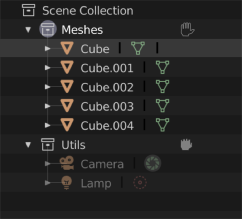
These would be totally interchangeable and could be transformed from one to the other with a single click. For example, this property could later be accessed and changed through an outliner toggle or a tab in the Properties panel:
This way, we can have both the functionality of a standard layer (collection set as layer) and a standard group (collection selectable as one object) features like we have in many visual apps. User could then select any collection in the 3D view with a single click on a member of a group, as it was one object. Selecting multiple groups - the same as selecting multiple objects - SHIFT+click.
A collection set to act as a group would have an additional state for accessing it's members - 'OPENED' and 'CLOSED'. To enter a 'group - like' collection the user would double - click on a collection.
Here's a mockup from by Ejnar Brendsdal (the model by José Petri ( www.josepetri.com ) from BlendSwap):

This proposal is primarily to obtain all those nice features of an industry standard group behaviour in Blender, but without going through a hassle of developing a whole new data category.
This feature could later on be expanded to other actions, such as assigning a material to all of the objects in a collection, or applying a modifier, or other transforms, all with a single operation. But primarily - a single-click selection in the 3D view.
16 Comments
Ideal implementation as far as I'm concerned is how the Group Pro addon handles it. gumroad.com/l/GroupPro
It lets you treat them like objects with an edit mode, can be nested and much more all from a single pie including changing the pivot/origin without any instances shifting.
Developer video showing it in action. youtube.com/watch
The developer has started porting to 2.8 and I really think should be hooked up with some of the dev fund to make their work a core part of Blender.
On a somewhat related note, he's also made scripts called "transform utils" to solve being unable to apply transforms to instanced meshes and change the origin/pivots of them without losing their positions. gumroad.com/l/TransformUtils
I say yes!! Yes ofcourse!!!
I always work in 3D Max with groups instead layers because it allow to toggle " Close " or " Open " group and handle group in viewport like ordinary objects. If group closed it works same as solid object so it can be transformed same as one object. It have it own Pivot (Origin in Blender) so all objects inside can be easily transformed around this pivot. Also what I find very important it avoid mistakes like when some object inside group was moved or etc. - group is closed & objects is locked inside all together. Also it give ability to select closed group inside viewport by one click without goving to Outliner.
Guys vote it up. Such workflow is wery handy :) Want to see same in Blender.
If this evolution of collection into groups (or group-like collections) could be imported and understood in Unity, it would help a lot.
Have you tried collection instances in "Shift+A" menu.
The blender is very lacking in groups of objects.
The easiest way to implement groups of objects is through parent. The first time you select a hierarchy, first select the parent object, then select the children.
Sorry for my English.
i think we just need folders in the outliner ( a new object type) that acts like an empty, can be dragged and dropped without problems, objects can be dragged and dropped inside and outside of it without problems in the outliner and folders also should have their own modifiers like array etc ( because not all modifiers would make sense for folders) :) and maybe a switch on top of the outliner for folder or collection mode or both.
@David Wallmann: Hi David. I understand what you're saying, but that would defeat the whole purpose of the proposal and slow down the manipulation speed to a tenth of the intended.
Of course, besides the main vewport manipulation feature, it would be nice if the outliner would enable drag-and-drop feature for the members, like in many graphic apps.
This has been asked for several times in many different ways. Hopefully a dev will pick it up.
Here are some issues with your proposal as it stands...or maybe questions that need to be answered before this could work is a better way of saying it.
You say it's not a new data type, but it is adding a lot of new functionality to a collection that isn't there. For instance collections don't have position, rotation, or scale right now because they don't need it.
Let's say you pick the collection and move it. Does that happen at the collection level or at the object level? 3ds does it similar to a hierarchy where the group is transformed and the objects follow the group. I could see it also working so that if you move 10 units in the x axis, that transform is applied to each object individually.
What happens when you apply a material to the collection? What happens when you add a constraint or a modifier?
What do you do with objects in different collections that are in the same hierarchy?
You select the collection and scale it with "Center Points Only" toggled on - what happens?
@dpdpforlife:
Very good that you asked this questions ... I am not author of suggestion but have some vision so I start typing my thoughts . Already have two pages with descriptions and specific cases. Maybe I complete it tomorrow after work, maybe saturday.
@dpdpforlife: Hey, yes, the proposal is strictly for collections to act as one object, a plain group-like behavior - so all included objects would act as they were joined into a single one, but would be accessible at any time. Let's see also what ideas will @forestgumpovu4 come up with.
A material apply would be awesome to implement, for example, if you apply a material to a group-like collection all objects would inherit it (perhaps after a dialogue popup), or there could be a shader-brush-like tool for transferring materials that shades only the objects inside a group, or single faces. Or - if you want to shade individual objects - just open a group and apply individually.
Well, in order to implement this kind of behaviour some strict rules would have to be introduced. You have to think about this as a one plain object - when closed, it would behave completely as a single mesh - no multiple origin points would be considered. It would scale as if it was one object, around a single collection origin point. That is the whole point behind this, to make life easier in complex scenes.
Could you explain the question no. 4 a llitle more?
@dpdpforlife:
After hours of thinking on it and few pages of text descriptions - to add such possibility and not cut out current Collection abilities it need to create sort of complex rules system with minimum of four states Unlocked, Softlocked, Hardlocked & Freezed. Then I look at all this descriptions mess and understand that all of this rules looks to complex and to cumbersome to be implemented. This old good system with Layers & Groups separated functionality was invented and implemented this way because of reasons ... Yes.
My verdict is:
Hey man! Give me credit! ;-)
@Lsscpp: Hey friend :) I don't follow you, have you made a similar proposal somewhere? Sorry if i skipped it, i've been rambling about this group thing for over 3 years now, but in a much stricter version, on introducing real groups, like the highly rated 'container' proposal. I thought of this compromise just yesterday, sorry if i stole an existing idea. If i did, cudos to Lsscpp! ;)
@Okavango: we are discussing this here developer.blender.org/T54842 and just one day before this proposal I posted the same idea. I thought you started from there ;). Peace!
@Lsscpp: Haha, yes, the same one, didn't see that :D Now that is what i call a synchro...
Nice term, 'seal', btw!
this is a great idea!