
DLSS 2.0 Style Upscaler for Blender
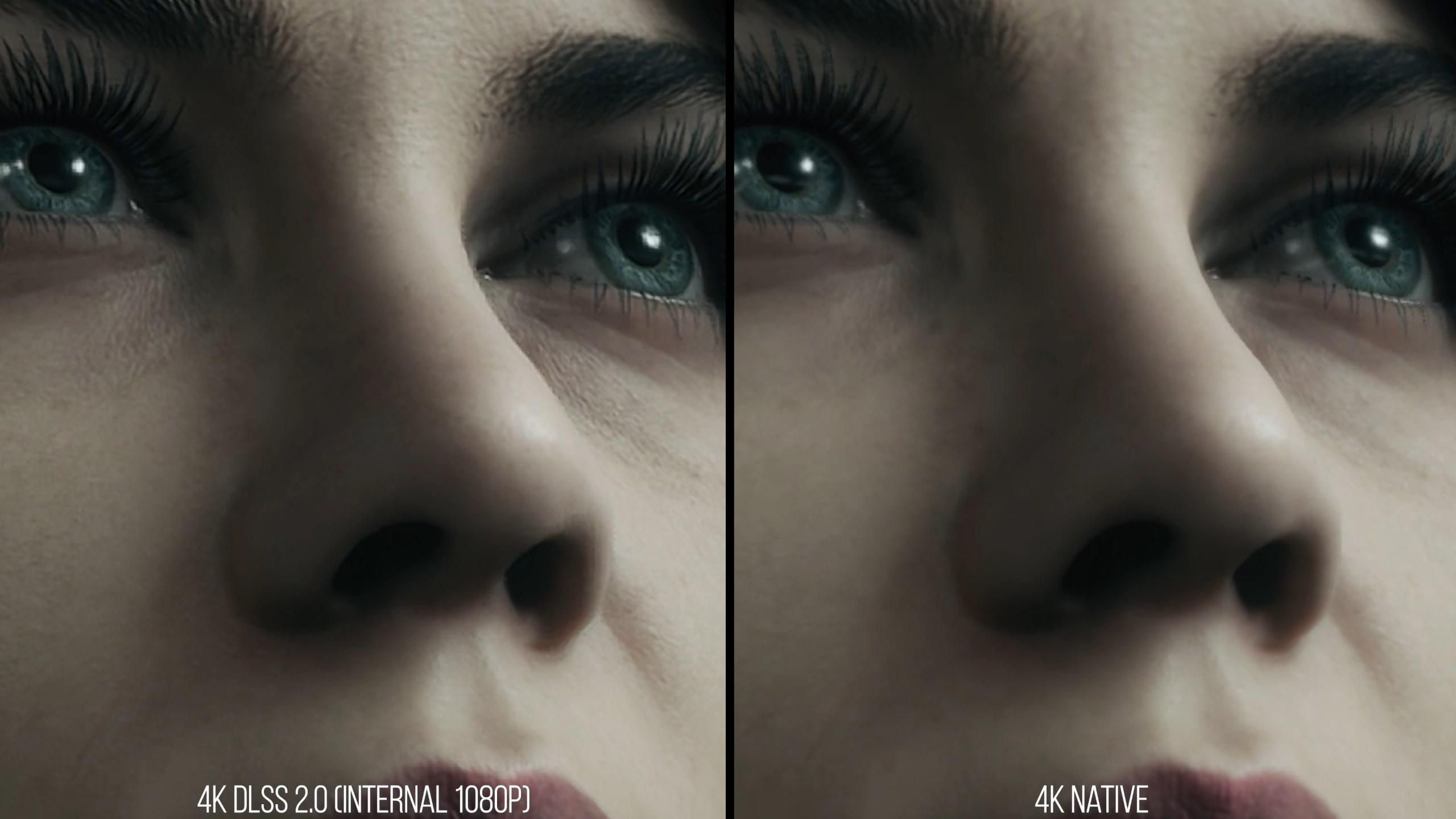
DLSS 2.0 has proven itself to deliver 4x times the pixels without almost any loss in quality in games. Blender has the same data to work with (Normal-data, Texture-data,...) and doesn't need to be rendered in real-time. I could not think of a better application than blender. Mind you, DLSS 2.0 only works on Nvidia Graphics cards. Since blender has support from, Intel, Nvidia and AMD there might just be a company willing to implement a universal solution (similar to the Intel denoiser). a 4x Speedup would be an absolute gamechanger and I do believe that it is only a matter of time, until it becomes reality.
15 Comments
Bear in mind that DLSS is not a general purpose solution at the moment. It needs specific data for each game. Each game needs to have data crunched by NVidia about how it is specifically upscaled and then that is sent out as part of their driver. I think that is a big part of why the quality can be so high, so it might be a while before we can have a general purpose AI upscaler that's worth the trouble.
* @kasper.arnklit * You are talking about DLSS 1.0 that needed specific training for every game individually. DLSS 2.0 on the other hand, has been trained on a generalized dataset and is even capable of upscaling videos. (The game-devs are still requiered to add DLSS 2.0 support to their own game, but I would expect the implementation to be far less difficult.) [And driver updates are not that nessesary anymore] DLSS 1.0 was a smeary mess, but I do think that a DLSS 2.0 style upscaler in blender, has a future :) (Details of the algorithm are down below, in form of another reply)
is DLSS 2.0 released as opensource from Nvidia?
* @NiCapp * I am afraid it isn't :( hence the "DLSS 2.0 style" but there are many competing solutions in development and one of them will surely be from AMD in a couple of months time
* @marcelago231101 * AFAIK Blender cannot use any kind of proprietary code because of his license
* @NiCapp * thats correct, tho Intel developed the Intel A.I. denoiser (as well as Nvidia with Optix denoising) for blender, so I wouldn't be too worried that AMD (or someone else, no idea) is not allowed to support blender with an upscaling solution with their signature on it.
* @marcelago231101 * OpenIntelDeNoiser is opensource, Optix denoiser no as you told. AFAIK OIDN is adapted and added in Blender from one Blender core developer not to Intel developer(s)
Blender allows Cuda rendering which is really fast. If they do that they can allow DLSS as well, can't they? AMD is offering FidelityFX Super Resolution for free to all companies. Hope this type of software support can be added soon. The source code is available here: gpuopen.com/fsr-source-available/ github.com/GPUOpen-Effects/FidelityFX-FSR
Hey, what happened to this ? If we "can haz hamburger" with OIDN being accelerated on GPU already, then for sure this should be also doable. Especially for viewport rendering! Instead of the 2x crappy preview that is not even interpolated. Uff...
unfortunately, DLSS isn't open-source, so it conflicts with the Blender license can't be used. If any game-style upscalers were to be used, it'd probably be AMD's FSR but even then, that is also not possible at the moment because Blender runs on OpenGL - and most games with upscalers use DX12/Vulkan (which DLSS/XeSS/FSR are written for).
so it could be more likely to be implemented when Blender eventually updates to Vulkan, idk
Have been using DLSS in UE and result is amazing, hope can be implemented in Blender, could be a game changer as well
***@mod moder *** Thats not how DLSS 2.0 works. for example with DLSS, the engine renders a 1080p image with full shading and in addition a higher resolution (probably 4K) Mask and render layers, such as normals, Diffuse Colour, depth, AA, Motion vectors,... and the list goes on. All that gets fed into the DLSS 2.0 A.I. wich then constucts new shaded pixels, based on all that data. Its NOT pulling data out of thin air and its fully aware of all the textures, goemetries, ect. It only guesses the shading based on the surrounding 'true' pixels that where rendered previously. And that by itself is a fairly trivial task.
Yes one might say "well isnt that a variation of A.I. denoising? A: Yes, but it involves far less guesswork and has potential to become production grade (at higher resolutions, where a small loss of information is not a great concern.)
It is not a silver bullet but the results in gaming prove its relative reliability (essencially no flickerling, smearing, artefacting), especially since DLSS 2.0 does not require Temporal coherance.
DLSS is not better than native 4K, it's faster but not better. Overall, it enhances sharpness and smoothers edges
* @vojikcosta * true 4K is better in most cases. But its not another FXAA. enhacing sharpness and smoothering edges, is a bit of an oversimplification.