
"Copy/Paste" Modifier
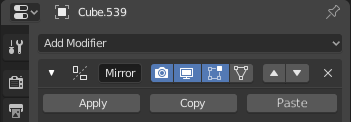
I think it would make more sense to copy a modifier (the same way it is now) but instead of instantly pasting in the same mesh, it would be stored in the clipboard and you could paste on any other mesh (including the mesh it was copied from). I know about the "Modifiers' link", but that removes all the modifiers previously in use in the second mesh.
4 Comments
There is an addon named "Copy Attributes Menu" that is already in blender and it needs just turning on in the preferences. when it's on you can copy modifiers between objects. with ctr+C and ctrl+V. You can also copy other things with it. see for yourself
* @jerzy.gorski.art * Oh, didn't know that one! Thanks, man!
Edit: Just checked here and it works like the "Link Modifiers thing", where it erases all the current modifiers on the object and replace by a second mesh's ones.
What if I need to copy a single modifier from a cube to a sphere, but keep the sphere's modifiers?
* @iemersonrosa * hm. It copies selected modifiers, not replacing em. You chosen wrong option. Use «copy selected modifiers». May be it is from «modifier tools» but it is in my copy attributes menu
* @ Vyacheslav * Ohhh! Found it now, it was there all along... it works fine indeed! Thanks! :)