
Display Eevee Sample Counts in Viewport Like Cycles
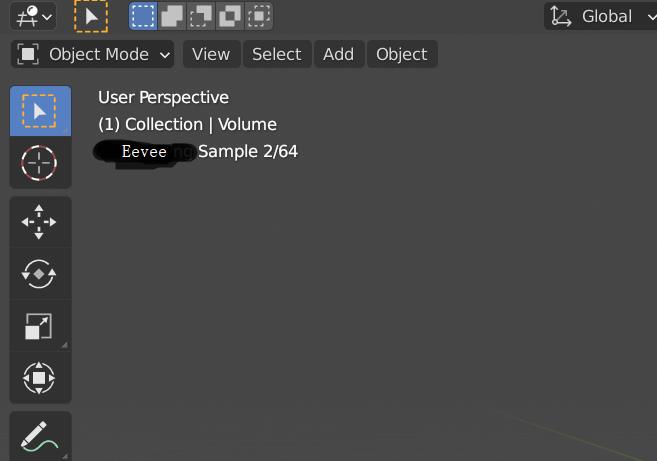
I am try to render volume in Eevee as well as materials in alpha hash transparent mode. I am trying to figure out how many samples I should use for the render, then I found it very inconvenient to not be able to know how many sample counts the viewport currently has. That does not make sense. There should be a sample count number at top left for Eevee as well, since its sample count matters for certain materials.
9 Comments
AFAIK Eevee render process
freezeblender UI, no way to have interactive progress bar or any IU change until it render, this is oneknow limitation* @NiCapp * I mean the viewport sample gathering, not the final render. There is no way the UI freezes in the viewport render view mode, how would it be a real time renderer if it does that?
* @EaryChow * Eevve is on
SEMI-realtime render engine, in Rendered or Material preview Viewport this not make much sense as not make much sense use 64 sampling in viewport, making this make eevee not realtime with worse render result thank to approximations made to make preview near to realtime. As you have see Eevee not show progressive render but finale render result (in viewport and render image), so viewport is refresh after end of viewport render (it freeze viewport for some time, too fast to be see)* @NiCapp * I still don't get it. Set the viewport sample to 1, you can see with your eyes that the viewport stops gather samples very quickly. Change it to 16 and you can see it goes further then stop after awhile. Change it to 0 which basically means no limit, it just keeps gathering samples none stop. It would not work this way if it just render and freeze for too short of a split second before showing to us like you said.
I think Eevee does it real fast, unlike Cycles, as it is a real-time Renderer, and so, it does not show samples. When you see the rendered view, all the samples are already... rendered in the view.
* @samanwayadatta * Not really, I have to wait sometimes for heavy materials
* @EaryChow * Wouldn't that be because the material has to calculate procedural shaders or load large textures?
* @thinsoldier * Sometimes yes. But some materials in particular are very heavy for Eevee. Like volume materials when the volume quality is set to 2 px and volume samples to 128 or higher. In this case, you can actually see how the volume gets subdivided as the samples are being gathered.
* @EaryChow * Agreed. Same here. I think you asked for the samples, and Eevee doesnt actually show it. Also it tries to do all the samples in a quick time, so it gets heavy for the computer, that is why Blender says that Eevee needs GPU.