
Offset Mirrored Object inside the Modifier
When you mirror an object you have to change the origin position to get the mirrored object in the right place.
What if you could put it in place by adjusting the offset inside the modifier? :)
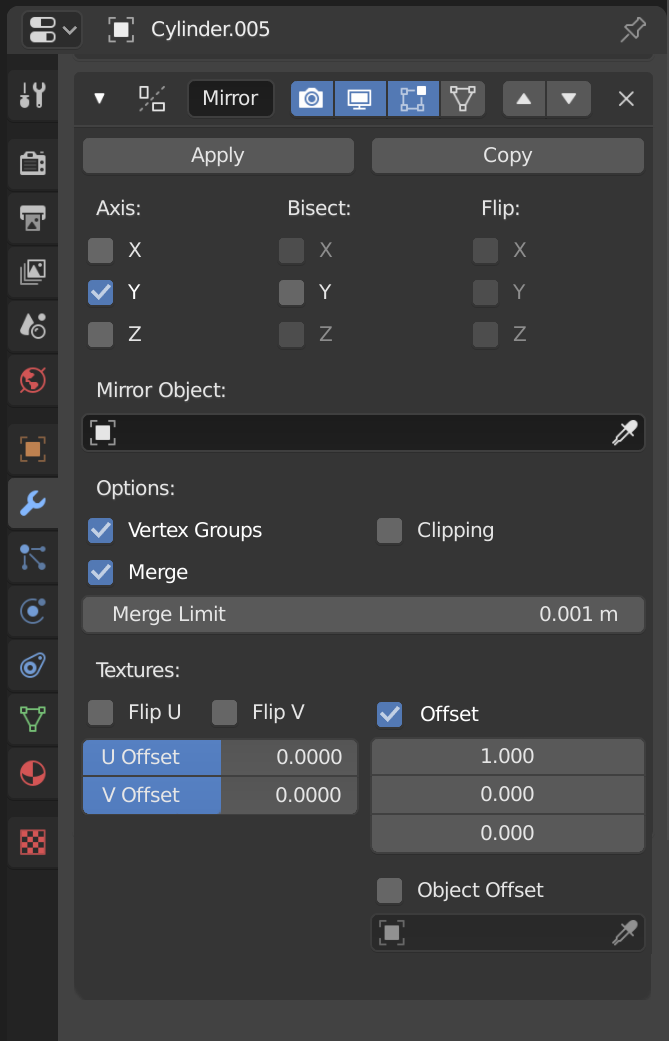
When you mirror an object you have to change the origin position to get the mirrored object in the right place.
What if you could put it in place by adjusting the offset inside the modifier? :)
16 Comments
That is why mirror to object exist. Empty or plane is more noticable than just offset digit. {attachment 33292802jpg}
There isn't a way to know how the mirror modifier works, that it is origin orientated and you can change the origin to affect the modifier result. This would even address that for new users... Cool!
In 3ds max modifiers has own gizmos (or centers, sometime both). First time you add new modifier it place this gizmo(center) at current selection (edit mode) or to object origin (object mode), but then you easily may manipulate it, placing and offseting... Maybe not so bad ideas, how you think?
* @impacman * oh like a custom offset guide in the viewport? I think it would be amazing actually!
* @impacman * Lol! Mirror modifier has Mirror Object setting for assigning object that will be origin, and you can manipulate it as you want.
Unbelievable knowledge of basic stuff
* @impacman * Glad to help you) Also I recommend you use Modifier List addon, this great addon automate creating of gizmos and many more.
This doesn't seem to make sense as far as I can tell. The whole reason to use an object as the origin of your mirroring is, well, to use a separate object. If you put those controls in the modifier, you may as well just put arbitrary X, Y, and Z values and forego the mirror object feature altogether.
* @Jason van Gumster * please explain? I very often use the mirror modifier to duplicate an object that is reflected. When modelling hard surface objects I often need symmetry in an object that is mirrored close to the original. I could offset the distance with this modifier.
* @GabrielMoro * You could just as easily offset the distance by adjusting the location of the mirrored object's origin. But if you want to use another object (like an Empty) as the mirroring axis, just move the Empty around; no need for additional numerical input.
Basically, what your proposing is essentially the equivalent of replacing the Mirror Object feature with X, Y, and Z offset values. It makes no sense to have both features (since, if you have offset values, you could use drivers to constrain them to an object). Personally, I like the Mirror Offset feature in its current form.
* @Jason van Gumster * but it isn't really that simple to be changing the objects origin all the time. It's way easier and non-destructive to implement this inside the modifier. It could also work by the origin, but offseting is more user friendly and intuitive.
* @GabrielMoro * Hence the mirror object feature.
* @Jason van Gumster * which is destructive and doesn't function as my proposal?
* @Jason van Gumster * Actually it's better this way, nibba. 3ds max has done this for years and it's very intuitive, you can even position the gizmo to world center and it will mirror the object perfectly. So, yeah, it DOES make sense. Cheers.
* @juancarlosgzrz * thanks Juan! :)
* @GabrielMoro * Mirror object isn't destructive. You add an object (like an Empty) to your scene and treat that object as the mirror object and you can use it as a widget as much as you'd like.