
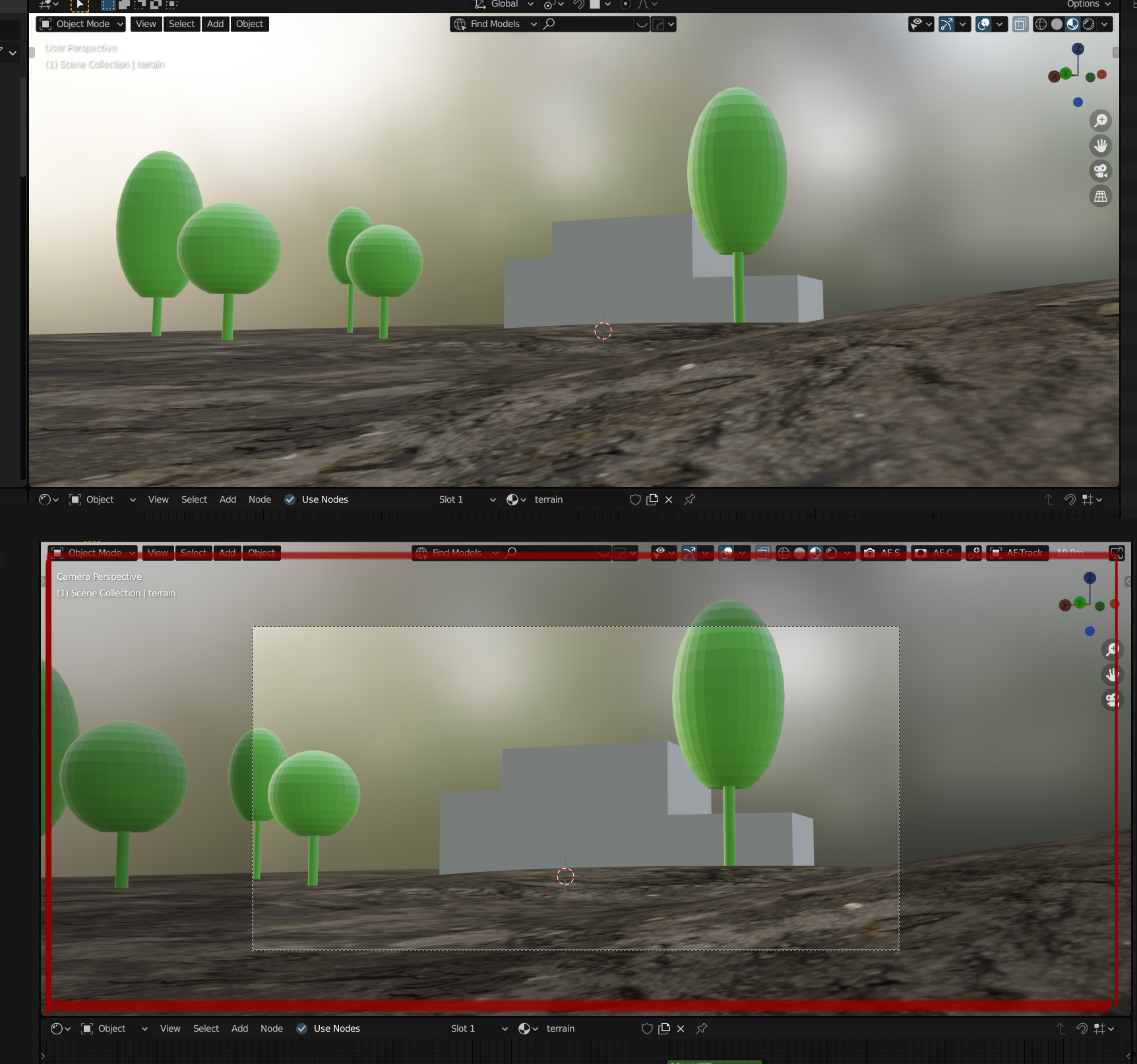
Camera from view matching the exact frame ,size and view of the viewport
I notice that often time you find a nice composition by navigating in the viewport ,when you add a camera from view , it doesn't match ,you basically have to reposition your camera ,length ,camera size etc , for example the focal length of the viewport is by default 50 mn ..when you add a camera from view the camera size is set by default to 36 mn if you add a camera from view ..it's cropped ,your composition is cropped .if you want the exact same shot than your viewport you have to set the camera size to 72 mn for a focal length of 50 mn wich is confusing . if you have a focal length of 35 mn in the viewport you have to set the camera size 35 + 22 = 57mn of course you can lock the camera to view and find your composition like that , but it would make sense that adding a camera to view ..what you see is what you get , the camera is synchronized to what you see it would match and fit the framing of the viewport !
14 Comments
Your idea is great
* @arkoprobhogupta23 * haha thanks :)
That is why I use home to expand camera frame and lock camera to view to search frame. But yes, matching camera to viewport view will be nice.
This is a great idea, but perhaps it could be a function, like convert viewport to camera, this way it would take the information of the viewport and set it to a new camera, and using the camera from view just add a default camera so you can tweak the values after.
YES PLEASE!
altough i understand your problem , i think in reality after you make something your going to decide the right camera for your movie, wich can be multiple types. I often use 70 and 90mm, but if your into landscapes 18 to 35mm Lots of books have been written on what type a camera works best for different topics. (camera's cause specific geometric view deformations).
SO in the viewports i want something that's always the same, giving me an impression of the world. In my final steps a play around with a camera setup and deciding focal views, paths, distances, zoom, etc..
So i dont hope an idea like this gets into blender.
It's not a fix, but press G then double Z and it will move further away.
Viewport field of view don't match the camera viewport, and i think it work good that way. I usually unzoom my camera to a smaller region and keep surrounding passout to know how i should frame.
Maybe making the area outside the camera black will help you analyze ypur composition better/ Passepartout under camera settings.
This is a cumbersome process
* @johnpdelacruz26 * sure , the passepartout help to focus but my point is that the viewport would be exactly synchronized with the camera from view , because sometimes ,just by navigating around ,you find a cool angle , the negative space is nice etc ..it's the composition you want ,you do ctrl+alt+0 and oohh ...it's cropped you have to tweak and it 's tedious to get the exact same shot ,the same perspective etc ..hope it makes sense,in c4d for example ,the viewport is your camera ,if you change the camera settings it's synch and it changes teh viewport as well when the camera is active ..it makes things alot easier and intuitive.
* @kaerobattossai * You may have a point but how about setting the viewport camera focal length the same as the output camera?
I am not sure if the angle you have seen on the viewport camera will look the same if your camera focal length is way different in the first place. Say viewport camera is 35 mm while actual camera focal length is 50 mm or 100mm.
Maybe try experimenting on the focal length first.
* @arkoprobhogupta23 * This cab be useful especially if you will be using a multi window workflow, where one of the window is assigned for the output camera view only and the viewport camera is also separate.
but for me, it's an unexpected behavior and ruin cool angle most of the time