
Theme customization
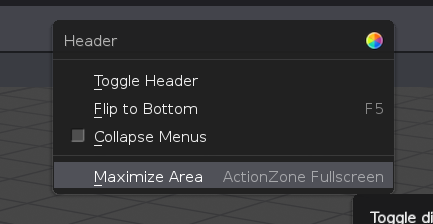
Has anyone proposed anywhere a way to make this better? I find it pretty bad every time I try to customize something. So much waste of time trying to find the right element. Wouldn't be easier to have it available by right-clicking areas? It could have that icon in the picture or an option that says "Customize" then it opens the Preference Themes section in the exact place where that specific item is or we can discuss here how things should be. Maybe they already thought a way to improve it.
The icon on the right its an idea which might not work in some areas as it happens, for instance, the title sometimes is too specific like right-clicking on the viewport icons. Another way would be simply popping up small windows with the available settings that can be tweaked for each type of element.
What's your take on this?
4 Comments
It would be great to hear other ideas on how we could achieve a better way to do it. Even if its just a nonsense brainstorm, I am sure we will get something positive out of it.
Honestly, this is going to be a tough one. With so many elements you got two options to leave it as is or make a simplified version of the theme section where things are connected so you got fewer elements to think about, As grauer.d mentioned a great option would also be a picker like the color picker where you can simply select what you want and it will highlight the right item in the list.
i have thought about something like this since i feel the same way when i want to modify some things in the ui. That right click customize functionality would be really nice.
An other thing would be some kind of ui-element picker from the theme section that filters the theme options on what you pick in the ui and then we dont have trouble figuring out what we need to change.
Collecting/ grouping certain elements and change them all at once could also make it easier, for example currently we need to change the window header in each editor type, this could probably be combined since i have never seen a UI with different headers per editor type^^
What i have seen in other software is that it has a little section that is like post processing color correction for the UI where one can change for example the overall contrast, saturation or hue for the whole ui which is really neat to give it that final touch:D
@grauer.d: You brought up some interesting points. I have never seen a UI with different colors or shading for different editors and maybe the Theme options are a little bit overwhelming so simplifying it would be a wise option IMO. The post-processing idea sounds good too but maybe if that would be it could feel a little bit too limiting. Another idea I had was adding some kind of highlight function to show you which area you are about to change when simply hovering over each name or something. Because what I do now is to change the color and if it's not what I want I hit escape but this not ideal because somethings are not visible sometimes and you got to enter the color picker each and every time so by scanning through the elements list and automatic highlights in the UI realtime would make much more intuitive. Those elements that are not visible could show up somehow otherwise it wouldn't make any sense. That's the tricky part.