
Is it possible to improve the gap performance between rendered frames?
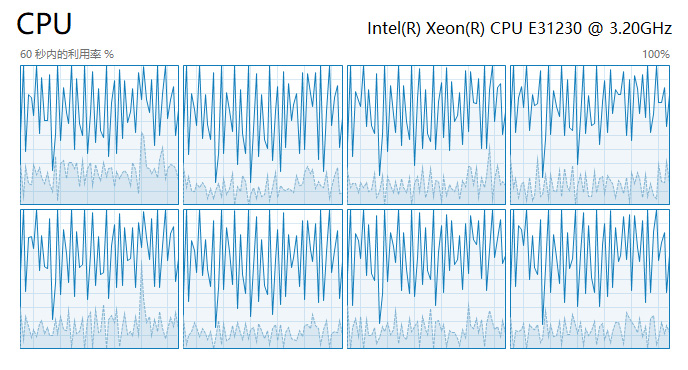
Because it has recently done a video that only takes 3 seconds per second to render, but has 3000 frames, the CPU and GPU performance is not full between frames during rendering (see figure). I wonder if it is possible to provide an option to have each thread render a single frame to minimize the loss of performance between frames.
4 Comments
This is probably doable via the shell script/command line, by opening a seperate Blender thread for each CPU core... that doesn't sound easy to write, though.
You should try it out and see if it actually provides a performance improvement.
Note that this will interfere with animation denoising (new feature for 2.8, no UI as of yet but doable via command line) and any post-processing that relies on previous frame data. Maybe it will be possible to work-around this issue, maybe not.
* @Josephbburg * It's not that hard to write a script that does this. I've done it both in Bash and in Python. This is a bit dated and specific to multiple GPUs and I've made some personal refinements since writing it, but it should give anyone interested a head start in writing their own scripts to do this kind of thing. The difference would be that rather than specifying a single GPU, you write your code to limit the number of threads a specific instance of Blender uses and you rely on the OS scheduler to figure out which core to distribute jobs to.
One caveat, though: I've done this before with a machine that had 56 cores (well... 28 cores, plus hyperthreading). It generally works OK, but running 56 separate instances of Blender tends to overtax the OS scheduler and cause frequent hangs until rendering is complete.
(removed an unrelated comment, to keep this thread on topic)
* @Josephbburg * This would probably best be handled as an RCS post using the Meta tag. I have answers to your questions, but I'd rather not clutter this proposal's comments.