
Eyedropper For Themes
Will help to find menu components faster. the purpose is to change UI components quickly by selecting a UI element with the Eyedropper tool ,witch will automatically scroll to the right tab.
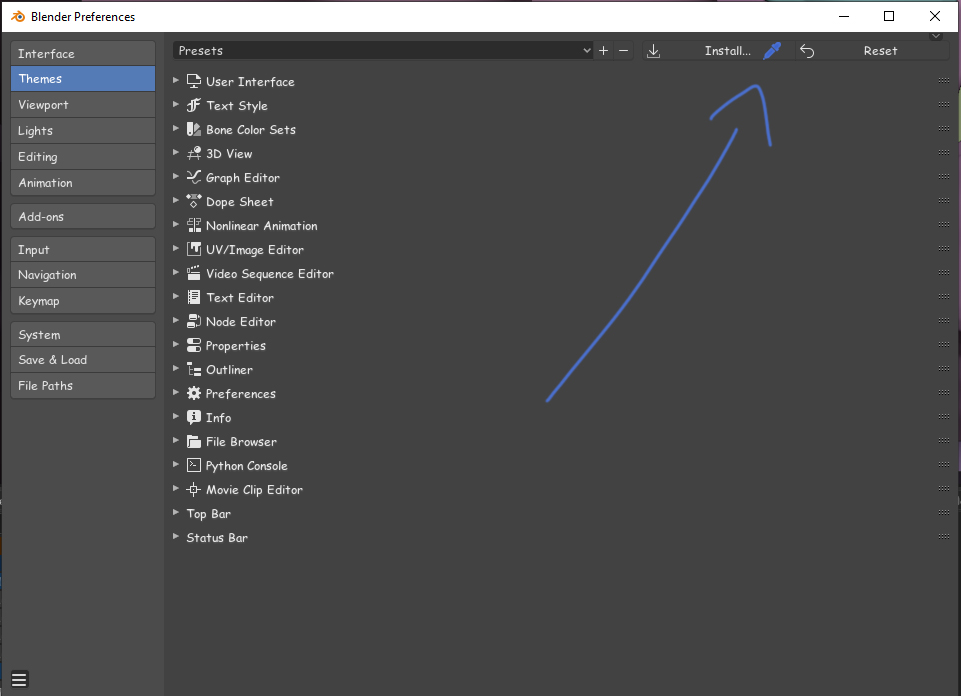
Will help to find menu components faster. the purpose is to change UI components quickly by selecting a UI element with the Eyedropper tool ,witch will automatically scroll to the right tab.
6 Comments
if you want to share colors look here: youtu.be/0yxz1SY-Ay0
If you want to pick a type of element, it is nice idea but it requires explanation.
* @ Vyacheslav * thanks i updated my proposal.
* @aabrany * ok, now I am sure. Good proposal, How do you suppose it should work with lines, bevels, etc small elements?
* @aabrany * So the idea is that you click on the eyedropper in Preferences, click any UI element anywhere in Blender, and the Theme section that's relevant to where you clicked appears in the Theme editor in Preferences. Is that correct?
If so, that's pretty close to what I figured you were getting at. That said, there are a few complications:
* @ Vyacheslav * lines, bevels small elements are part of some UI element, and Eyedropper can point to a size of one pixel, and From my point of view it can bounce more than one option,But the main intention is to get to the obvious UI elements.
I think I understand what you're suggesting here, but could you explain further how you expect it to work so no one makes any incorrect assumptions?