
Grease Pencil - Cycle Modifier
Problem
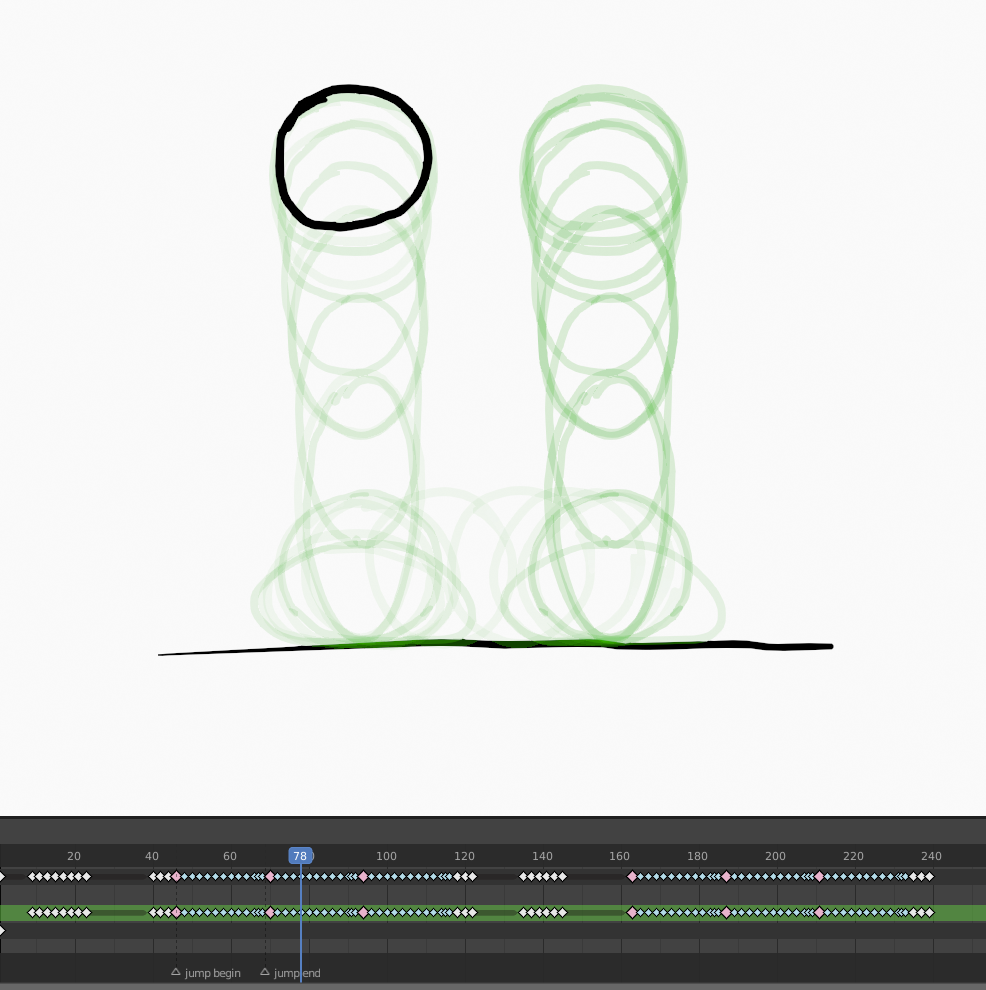
Say you wanted to create this animation.

I've created the repeating jump by copy/pasting keyframes and shifting the position of the last three. But what we'd really want is a way to edit any of the frames of the jump and have that change propagate to the other instances of the jump without any extra work. Right now, if I want to refine any of the frames i have to copy that change five times. This is slow and error-prone.
We can't use the Time Offset modifier to help with managing this repeating motion. Currently it's only good for creating animation that loops continuously over the entire timeline. You can't use it to loop a sequence of frames just a few times, preserving the frames before and after that section as they were.
Proposal
There'd be a new modifier called Cycle.
Cycle has the following parameters
- Source Range: Start, End (frame numbers)
- Playback Range: Start, End (frame numbers)
- Loop mode: Forwards, Backwards, Ping-Pong, Random
- Random hold: a number corresponding to how long each randomly chosen frame should be held, for Random mode only.
- Offset: Position, Rotation, Scale value groups.
- Additive Offset: P, R, S value groups.
Source range
The range of frames on the timeline (prior to this modifier processing anything) that will be used as the 'content' of the loop.
Playback Range
The range of frames on the timeline where the loop will playback when the playhead is moving over it. The modifier alters nothing outside of the playback range.
Loop Mode
Forwards
The loop content plays according to the order of the source frames from left to right.
Backwards
The loop content plays according to the order of the source frames from right to left.
Ping-Pong
The loop content plays the source frames from left to right, then from right to left, and repeats that pattern.
Random
A randomly chosen source frame is displayed for each new frame the playhead enters. The Random Hold value (1 by default) can be used to extend the number of frames each randomly chosen frame is held for.
Offset
The Position, Scale, Rotation group determines the initial offset of the played-back cycle relative to the source frames. In the animation above Offset would be used to shift the jump animation to the right.
Additive Offset
This Position, Scale, Rotation group allows the user to specify an additional offset that is cumulatively applied at the start of each loop repetition (Random mode is excluded here). This is useful for walk cycles for instance.
Notes
For each section of looping playback you need in your animation you'd add another instance of the Cycle modifier. The animation above would use two of them, for the two looping jump sections. Both modifiers would reference the same range of source frames so that corrections to the drawings would instantly update in all the relevant places. The second modifier would use the Offset controls to translate the position of the drawings over to the right to match the ball's location.
The 'Keep Loop' part of the Time Offset modifier would be removed (breaking backward compatibility), all looping stuff would now by handled by Cycle instead.
A convenience context menu function could be added to the Grease Pencil timeline. A user can select a pair of keyframes and choose 'Loop sequence' (the last keyframe would be excluded from the loop itself, it would restart at that point). The user would be promted to enter the number of repetitions of the loop they would like to have played back. A new Cycle modifier would be created with appropriately set Source Range and Playback Range values (the two ranges would have the same start frame)
6 Comments
Greetings,
Time offset -> chain mode was just added to 3.4a. developer.blender.org/D15052
This comes close to what this post proposes. The movement you can do with offset modifier or layer transforms.
I have the patch ready that comes very close to what is outlined in this post. Note that offset (P,R,S) has already been possible for sometime either by using offset modifier or parenting layer to an object. This patch creates list of time segments: developer.blender.org/D15052
twitter.com/blenderislove/status/1530570167994011665
some progress on the chain/cycle mode
Ping pong option was just added. I'll check if I can make this more advanced type of modifier, actually had an exact same idea before even finding this post :)
There is a cycles f curve modifier in the graph editor to cycle keyframes. It is currently fairly limited, but it could eventually handle most of the stuff you described.
* @zorro.weaver * ah yeah. as far as i know Grease Pencil keyframes aren't connected to the graph editor at all.