
Change Focal Length on the fly (Scrool Wheel or Custom Shortcut) in The 3D View/Walk Mode/Fly Mode
Hello Guys,
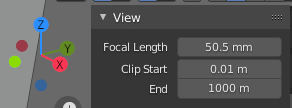
I found no shortcut to change the focal length and I cannot create one by right clicking on the panel. Maybe this possibility exists but I did not find any topic on the subject! Thanks for taking the time to read this. Friendly
9 Comments
Maybe macro? blender.stackexchange.com/questions/56005/how-to-create-macro-record-actions-while-modeling
* @ManBlender * Yes, this is a good idea, I just find Python comand reference here, but I'm not sure how to use it for the moment. Looking for make it to work =) docs.blender.org/api/current/bpy.types.SpaceView3D.html
Thx I'm looking with python, but new in this
* @maxime.mj * Ok This is not the right on, It's [types] and I think I need [Operator]
I think that exist bug around. Right? Usee zoom by scroll, the values not chaning. Move values.. reaction. Now hit the camer square (yellow not orange outline), no hanging nothing.
* @ManBlender * this same when Scaling with box, select active, shift to camera view.. no option to scale.
* @ManBlender * I don't think there is bug about the viewport. it just lacks the way to easily set to a shortcut for the viewport's focal length. This request has nothing to do with cameras, you can create your own request if you need more help about it.
I have an off-topic question: Align Active Camera to view seems to NEVER give an exact replica of the original view in the camera. On several occassions to get an exact replica I had to set the camera object to be HALF of the focal length of the viewport. Why is that? Does anyone know? It seems the 50mm in the viewport is not actually 50mm if a real camera object has to be 25mm to get an exact match to the viewport.
It's better if you create your own topic with your tags