
Remesh modifier safeguards
I'd like to propose redesigned UI for Remesh modifier.
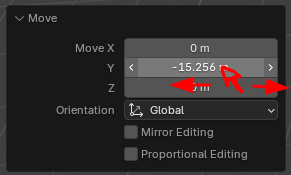 Every even slightly advanced Blender user is propably very familier with the following type of "slider" number picker UI element. It is used in almost everything and "trains" the users to think grabbing it is viable option anywhere they see it.
However this is where the problem comes in:
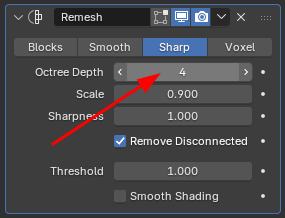
Notice how the exactly same UI element is used here Everyone who has ever used Remesh modifier knows what happens if you grab and pull this one as they have done to thousands of other same looking sliders. Well, if you grab this one, your Blender will freeze and/or eventually crash. (Atleast on an average user desktop pc). This is caused by the exponential growth of resources needed per Octree Depth increment (Or equivalent in other solvers)
What i propose: I'd like for some kind of safeguards on these kind of operations that rapidly explode on required resources. Most feasible solution would propably be to implement new UI element for these kind of risky operations that dont allow for rapid change of value. Simplest one would be to disable the click&drag feature on some of these sliders but I'd like there to be a visual change too so it would not be so intuitive to just click&grab it.
This change would help lots of newcomers who come into blender and start trying stuff out. At somepoint its guranteed they will find this option too and start messing with it and at that point if they had any important work not saved... Well, its gone then.
Also it would be cool if Addons that also use algorithms that have high resource/input growth rates could use this new UI element aswell.
0 Comments