
Add to Driver's popup window, basic controllers (Lock Window/Close Window) so they don't vanish all the time!!
Hi. I believe this is a niche, but a fair Request. I do a lot of Rigging, but I'm sure anyone who has tried to work with Drivers in Blender has eventually faced this little annoying behavior (from Driver popup window) at some point. I placed a screenshot with a simple proposition.
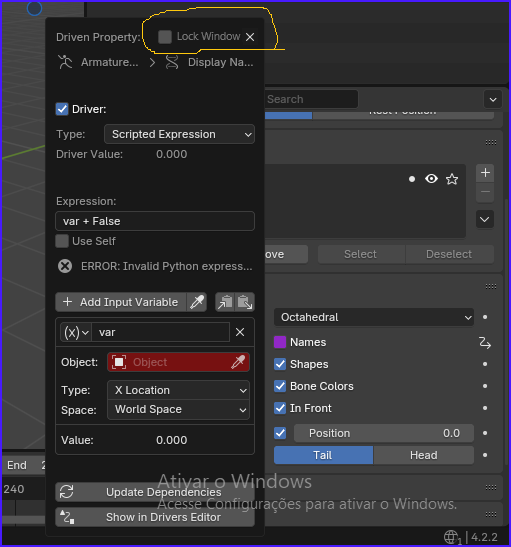
Context: sometimes, we JUST want the Driver popup window to stay visible, while we go on another Area/Editor/Region/Tab/Panel in the UI to verify/check/copy some data, because Drivers are already complicated on their own: values sometimes need to be memorized, and on-going results rigorously tested, all working in synchrony, and if the UI doesn't help the user (or the rigger) with these tasks, this ain't good.
However, by implementing a simple solution like these, the user at least has the option to manually Lock (and directly Close) the Driver popup window on-demand; this won't change the current default behavior of it, which is the cause of the current problem I'm stating:
The Driver popup window VANISHES, if the user moves the mouse cursor just a few centimeters AWAY from the popup window (it's not even a matter of Clicking outside of that popup window!). How can the user analyse/copy data, to work with Drivers in quick manoeuvers, if the popup window keeps vanishing all the time? I know there is the "Show in Drivers Editor" Button. But, all I want, is to keep that little, cool Driver popup window visible, JUST A LITTLE LONGER, so that I can keep testing test the Driver for basic behaviors and correct data inside Driver popup window, solving problems right away. AND, if I need to use Drivers Editor, for going into more DETAILS, then, sure, I'd gladly Click that Button: "Show in Drivers Editor".
Thanks!
0 Comments