
Select according to world axis
In this case, I want to select all faces on the right side.
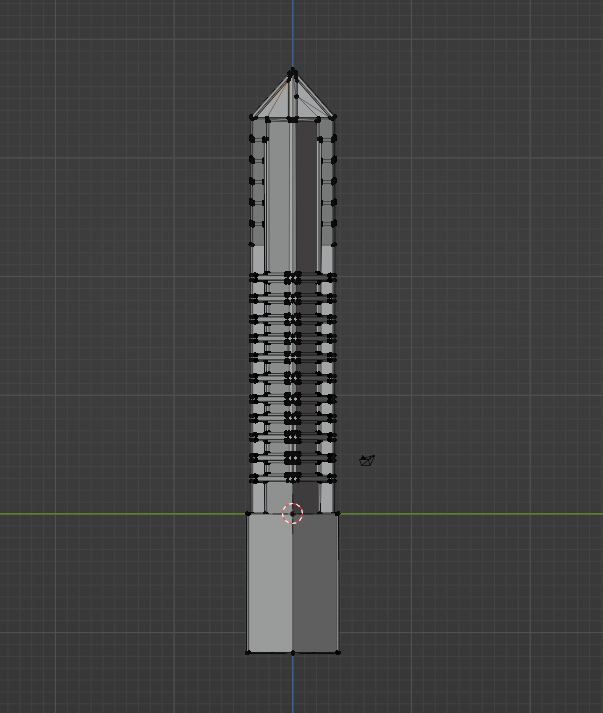 I can of course use the select box with x-ray, but this can be cumbersome with bigger models with many verts. To prevent over- or under-selecting, I would have to zoom in and out often or try to be pixel-precise with my selection box. This could easily be bypassed with the ability to select along a world axis. It is not something that needs to be done often and could be added to the standard edit-mode select menu.
This is a situation you can easily find yourself in if you want to make further symmetrical changes after already having applied a previous mirror modifier or want to edit an imported symmetrical model.
I can of course use the select box with x-ray, but this can be cumbersome with bigger models with many verts. To prevent over- or under-selecting, I would have to zoom in and out often or try to be pixel-precise with my selection box. This could easily be bypassed with the ability to select along a world axis. It is not something that needs to be done often and could be added to the standard edit-mode select menu.
This is a situation you can easily find yourself in if you want to make further symmetrical changes after already having applied a previous mirror modifier or want to edit an imported symmetrical model.
6 Comments
Simplest solution is Edit Mode > select a vertex > Select Menu > Side Of Active. Typically when I use this I have to select the side I want to keep and then invert the selection to select the side I want to delete.
2nd simplest solution is a boolean object positioned in the quadrant/side of the grid you want to delete. This can case stray verts and edges if your model is not symmetrical at the center line.
3rd and best solution is Geometry Nodes. It's like Side Of Active on steroids.
You'll need Group Input Node, Delete Geometry Node, Position Node, Separate XYZ Node
Group Input[geometry] into Delete[geometry]
Position into SeparateXYZ[vector]
SeparateXYZ[x] into DeleteGeometry[selection]
If you're importing a symmetrical model then the simplest solution is to select the center edge loop and use V to rip it away from the other half of the model. Then use Ctrl+L to select all verts attached to the selection. Then delete.
Thanks, knew that there must have been a function like that.
Have you tried Side of active in the Select menu or Select Mirror ?
I apologize if this function already exists, but I couldn't find it.
Interesting and how is it called?
Well, no, it doesn't seem to exist yet. I was apologizing in the eventuality of it existing, as I would have wasted time with this request.