
Add an Automated "Jump to Selected" Toggle in Blender’s Graph Editor (Similar to Maya’s "Snap Time to Selection")
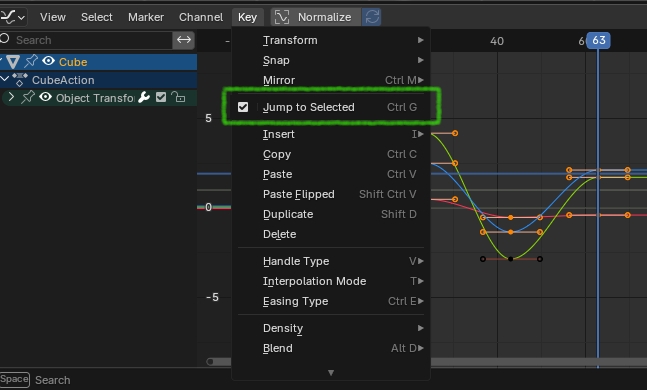
Description: In Blender’s Graph Editor, the "Jump to Selected" feature (accessed via Ctrl+G) allows animators to snap the timeline playhead to a selected keyframe. This is incredibly useful for quickly navigating keyframes during animation workflows. However, it requires manually pressing Ctrl+G each time, which can become tedious and repetitive, especially when working with complex animations or frequently switching between keyframes. In contrast, Maya’s Graph Editor has a "Snap Time to Selection" option with a simple ON/OFF toggle. Once enabled, the timeline automatically jumps to the selected keyframe without any additional input, streamlining the workflow significantly. I propose adding a similar toggle in Blender’s Graph Editor to automate the "Jump to Selected" behavior, making it an optional setting that users can enable or disable based on preference.
Proposed Feature
Add a toggle checkbox labeled "Auto Jump to Selected" (or a similar name) in the Graph Editor’s header or View menu. When enabled, selecting a keyframe in the Graph Editor automatically moves the timeline playhead to that frame without requiring Ctrl+G. When disabled, the current manual behavior (Ctrl+G) remains the default, preserving flexibility for users who prefer it.
Refrence Link:
youtube.com/shorts/b_o4JoO8FJ0
Why It’s Useful
Efficiency: Eliminates repetitive keystrokes, saving time for animators working on detailed or fast-paced projects.
Consistency with Industry Standards: Aligns Blender’s animation tools more closely with workflows in other software like Maya, easing the transition for new users.
Optional Control: A toggle ensures it doesn’t disrupt existing workflows for users who prefer manual control.
Why It’s Better
Reduced Physical Strain: Manually pressing Ctrl+G dozens or hundreds of times in a session adds unnecessary strain on hands, especially for animators with long work hours. Automation removes this repetitive action entirely when desired.
Faster Feedback Loop: Instantly seeing the selected keyframe in context (e.g., in the 3D Viewport) speeds up iteration and decision-making, as there’s no delay between selection and timeline adjustment.
Smarter Workflow: The toggle adapts to intent—turn it on for rapid keyframe navigation during timing adjustments, turn it off for multi-key editing. This flexibility beats the one-size-fits-all Ctrl+G approach.
Competitive Edge: Blender already rivals paid software; adding polished, user-friendly features like this makes it stand out even more as a professional tool, attracting and retaining animators.
How It Could Work:
Location : Place the toggle in the Graph Editor under the KEY menu for easy access.
Behavior : When "Auto Jump to Selected" is ON , clicking a keyframe instantly updates the current frame in the timeline and 3D Viewport. No additional shortcuts needed.
Technical Note: This could build on the existing Ctrl+G functionality, simply triggering it automatically on keyframe selection when the toggle is active.
Comparison to Current Workflow:
Current: Select keyframe → Press
Ctrl+G
→
Timeline jumps.
Proposed: Enable
"Auto Jump to Selected"
→
Select keyframe
→
Timeline jumps automatically.
Note on Multi-Key Selection Behavior in Maya and Blender What Maya Does:
In Maya’s Graph Editor, when multiple keyframes are selected and "Snap Time to Selection" is used, the playhead moves to the latest selected key. This means if you select several keys in sequence, the playhead snaps to the most recently selected one, aligning with your immediate focus—perfect for quickly inspecting or tweaking that specific key.
What Blender Does:
In Blender’s Graph Editor, when multiple keyframes are selected and you use "Jump to Selected" (Ctrl+G), the playhead jumps to the middle key of the selection, based on frame number. This gives a central point within the selected range, which can be useful for an overview but might not match the user’s intent if they’re focused on a specific key, like the last one they selected.
How Blender Could Update This:
Blender could enhance this feature by adopting Maya’s behavior as an option—making the playhead jump to the latest selected key when multiple keys are selected with the "Auto Jump to Selected" toggle enabled. To make it even better, Blender could add a preference setting in the Graph Editor, allowing users to toggle on and off different behaviors, such as:
1. Jumping to the latest selected key (Maya-style, for immediate focus).
2. Jumping to the middle key (Blender’s current behavior, for a balanced overview).
3. Jumping to the first selected key (for workflows starting from the beginning of a selection).
This toggle on and off functionality would let users easily switch between these options— latest selected key, middle key, or first selected key —based on their workflow needs, making Blender more flexible and intuitive while improving efficiency.
I’d love feedback from the community! Do you find Ctrl+G repetitive in your workflow? Would a toggle like this improve your animation process? If developers are interested, I’d be happy to discuss further or test any prototypes. Let’s make Blender’s Graph Editor even smoother for animators!
0 Comments