
lattice modifier as FFD
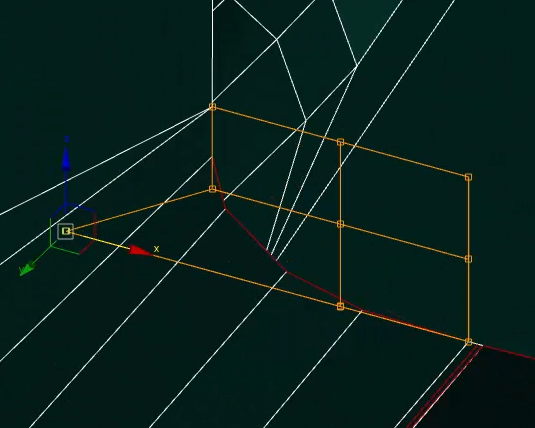
Dear developers, I use the Lattice modifier and it limits me a lot. I think many people will support me. There is an FFD (Free-Form Deformation) modifier in 3dsMax and it often simplifies the modeling work, I would like to add this to Blender. Screenshot with an example
5 Comments
What you probably want is Cardinal interpolation deformation type under Data properties and Interpolation.
The stuff that you dont have in blender is automatically generated lattice cage that perfectly wraps around(though im not sure if it is automatic from the example I have checked). But in blender you have to scale lattice the way you want and need it.
Proposal: Quick Lattice Modifier (Improved FFD Workflow)
Problem
The current Lattice Modifier in Blender is functional but not practical for modern workflows: • Requires manually creating and assigning a separate Lattice object. • Works only on the entire object, not on selected vertices/edges/faces. • Leaves behind a lattice object after applying, cluttering the Outliner. • Resolution (number of control points) must be predefined, no quick way to adjust it. • Because of this, many artists skip the modifier or rely on third-party add-ons.
This makes Blender’s Lattice tool feel outdated compared to industry-standard Free-Form Deformation (FFD) workflows.
Why current solutions fall short • Proportional Editing → good for small tweaks, but no cage-based control. • Hooks Modifier → powerful but cumbersome for broader deformations. • Shape Keys / Vertex Groups → flexible but require heavy preparation.
None of these are a true replacement for a simple, quick FFD workflow.
Proposed Solution: Quick Lattice Modifier
Instant cage creation • Add a lattice cage directly around the object or the current selection (verts/edges/faces). • No need for separate objects or manual assignment.
Interactive resolution control • Adjust subdivisions on the fly with mouse wheel: • Scroll → uniform resolution. • Ctrl + Scroll → subdivisions along U. • Alt + Scroll → subdivisions along W. • Shift + Scroll → subdivisions along V. • Much faster and more intuitive than fixed presets (2×2×2, 3×3×3, 4×4×4).
Clean Apply • On Apply, deformation is baked into the mesh and the cage disappears. • Keeps the Outliner clean.
Viewport visibility options
Two toggles in the modifier UI: • Show Lines – toggle cage edges. • Show Points – toggle control points.
This allows three modes: only lines, only points, or fully hidden.
Technical Notes • Interpolation: uses B-spline basis functions (as in traditional FFD). • Smooth, predictable influence from control points. • Standard math for Free-Form Deformation:
P(u,v,w) = \sum_i \sum_j \sum_k B_i(u) \cdot B_j(v) \cdot B_k(w) \cdot P_{ijk}
Benefits • Faster workflow – no unnecessary setup. • Intuitive control – artists focus on shaping, not managing objects. • Cleaner scenes – no leftover cage objects. • Animation capabilities – doubles as a deformation tool for motion design. • Industry alignment – meets expectations of artists used to FFD in other DCCs.
Example Workflow 1. Select an object or subset of geometry. 2. Add → Quick Lattice Modifier. 3. Use scroll wheel (and modifiers) to set resolution. 4. Deform geometry by moving cage points. 5. Apply → baked result, cage vanishes. 6. (Optional) Keyframe cage for animated deformations.
I'd avoid bluntly calling to copy a proprietary software. That's potential for troubles (see this post for more context on that), and in the first place it doesn't make a good feature proposal since it assumes that both community members and developers are already familiar with what you refer too, which you can't guarantee.
Apart from potential legal implications: we rarely have to "copy" anything nor add new systems, we can also just make our current tools better. Which is also simpler to implement and maintain.
Instead, I would advise you to flesh out your proposal so that anyone can understand the idea and its potential benefits, and developers passing by should also be able to assess its feasibility without needing to conduct extra research.
Start by describing the current need:
Then, outline potential solutions:
The current Lattice Modifier in Blender is technically functional but not usable for fast workflows: • Requires manually creating and assigning a separate Lattice object. • Works only on the entire object, not on selected vertices/edges/faces. • After applying, the lattice object remains, cluttering the Outliner. • Lattice density (number of control points) must be predefined and cannot be adjusted interactively. • As a result, the modifier is rarely used in production without external add-ons.
This makes Blender less competitive compared to industry-standard workflows, where quick FFD (Free-Form Deformation) tools are considered basic deformers.
Introduce a Quick Lattice Modifier workflow with the following core features:
a) Instant cage creation • Add lattice cage directly around the object or the current selection (vertices/edges/faces). • No need for separate objects or manual assignment.
b) Direct interactive resolution control • Adjust cage resolution on the fly while creating: • Scroll Wheel → uniform subdivisions. • Ctrl + Wheel → subdivisions along U. • Alt + Wheel → subdivisions along W. • Shift + Wheel → subdivisions along V. • Provides a faster and more intuitive setup than current fixed presets (2×2×2, 3×3×3, 4×4×4).
c) Clean Apply • On Apply, the lattice deformation bakes into the geometry. • The cage object disappears automatically (no leftover objects in Outliner).
d) Viewport visibility controls • Two toggles in the modifier UI: • Show Lines – display/hide lattice cage edges. • Show Points – display/hide lattice control points. • Allows different editing modes: only lines, only points, or fully hidden.
e) Animation-ready • Cage vertices are keyframeable. • Enables FFD animation (squash & stretch, morphing, stylized deformations). • Integrates naturally with Blender’s existing keyframe/animation system.
P(u,v,w) = \sum_i \sum_j \sum_k B_i(u) \cdot B_j(v) \cdot B_k(w) \cdot P_{ijk} • Where P_{ijk} are cage control points, and B are cubic B-spline basis functions. • This ensures smooth, predictable deformation consistent with industry standards.
Benefits • Faster workflow → eliminates extra setup steps. • Intuitive control → artists can focus on shaping, not managing objects. • Cleaner scenes → no leftover lattice objects after applying. • Animation capabilities → makes Lattice a powerful tool for both modeling and motion design. • Industry alignment → meets expectations of artists migrating from other DCCs.
Mockup Workflow Example
Integration • Fits into the Modifier Stack as an enhancement of the existing Lattice Modifier. • Could be exposed as a separate “Quick Lattice” operator for ease of access. • Minimal UI changes: just add resolution controls + two visibility toggles.
Your screenshot shows no useful information; you should discuss what it is about the blender lattice that you wish to behave differently.