
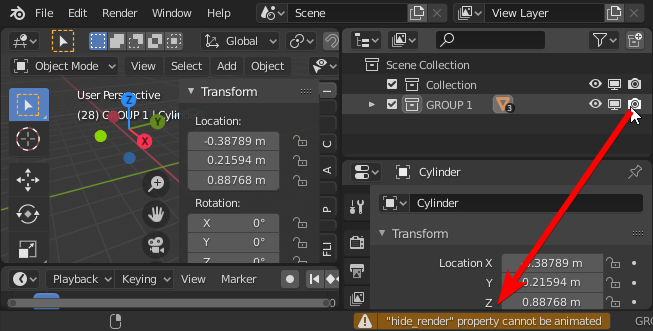
Animate enabling/disabling visibility of the collection.
For example - i have rigid body simulation of 300 objects - in some point I want to make them invisible in render, and enable 300 cloned objects without modifiers/rigid body sim.
At this moment I must animate visibility for every object (sum 600).
 Or there is an other method for situation like this, which I didn't learn yet... :D
15 Comments
I figured out this solution youtube.com/watch I hope it will be possible to just animate visibility of collections in the future though.
* @Jan van den Hemel * this solution works. But in many cases having the collection directly animatable will be a nice idea
Yes. +1 +1 +1.
Just had this exact same issue with a rigid body simulation in a VFX shot.
Or add possibility to group objects for animating visibility ~ :D
* @gadas_ * yes but why not just use what's already there and just make collection visibility animable like it already is possible for objects.
The instance collection workaround is just that- a workaround. This isn't really practical where you have a collection that has been auto created, such as with a simulation of baked object fragments, because it then repositions your entire animation. Toggling the renderability of a collection in rendering would ideally be as easy as for any other object.
true. agree 100%
+1.
All the workarounds proposed here and on forums (collection instances, geometry nodes Collection Info...) are not very helpful.
It should be a one-click solution (click on collection visibility property / keyframe).
An essential feature for complex projects.
I have had some scenes where there is hundreds, sometimes thousands of objects that are nice to render when visible to the camera. But at some point during the render they become practically invisible to the camera. So disabling them from render at that point becomes a meaningful speedup to the render time.
Currently one can manually toggle the visibly during render. And it does apply the next frame. And that is how I have done things thus far. Check in on the progress on occasion, and when it has reached some point I manually toggle the collection's visibility in renders. This is easier for turning visibility off, since turning on one don't want to be late with. Then the other approach bellow is better
Another solution is to render out each sequence individually and manually toggle stuff one wants and not for each sequence. Which isn't that bad to be fair.
Yeah I just want to key a whole character on/off at a certain point. Very clunky not being able to just do that. I suppose I have to build it myself into the rig. There must be a solution to implement this...
Oh no, I was googling it, hoping to just find something like "just click that button" or something. Now I ended up here... why doesn't it have more upvotes?
Yep, frequently needed.
This is much needed, I don't see where this would cause problems, please make this happen, would save so much time
Its just not clear why its not possible.. Seems like an easy thing to do just a loop keyframing every object in the collection...
The main problem is, that an object can be two collections. Not many use that, but in a true layer system you have hierarchies solving this issue. Could have been easy with layers, bit they did collections. Also if object could inherit visibility, like in every other 3d app default, this could have been easy done. Well it messes with collections, but as there are no layers… I repeat myself