
Modifier stack Improvements - New ON/OFF switch decoupled from visibility
In short
Incorporating same UI patterns as the Outliner + Extra layer of visibility control with ON-OFF switch: making available the toggling the visibility of only a certain set of modifiers ( the Switched OFF modifiers wont be turned on regardless the visibility state of the modifier).
Case
Doing modeling. Wanna debug Bevel issues with Mirror on. But I don't need the Array, Curve Lattice and Subdiv etc on (See image below)
Wanna toggle the visibility only for Bevel and Mirror.
Problem
Toggle modifier visibility (hooked on Space for me) turns all modifiers visibility off... hitting again on. Have to manually turn on Bevel and Mirror again.
And it start all over a thousands of times (imagine a complex model)
PROPOSAL
Add an extra layer of visibilyt NO/OFF modifier which is decoupled from the visibility. So if I Hit Toggle Visibility of Modifiers it does keep the modifiers in OFF or ON state, ignoring the visibility. This way we could debug sets of modifiers, when modelling.
I propose the same logic as the Outliner has, using the checkbox for that ON / OFF state.
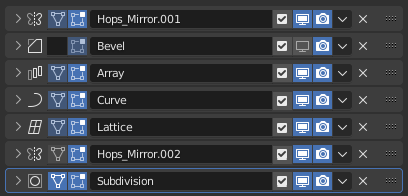
Extra Sugar Coat: option to configure visibility of the icons on the right like in the outliner.
9 Comments
I really don't get it. What you need is the ability to select multiple modifiers and toggle their visibility at once, not an extra button.
Blender has way too many buttons for visibility in the outliner, which is just a complete mess. Let's not do the same here. There should only be two, everywhere: Visibility for the viewport (eye icon) and visibility for Renders (camera icon). That's it.
Do you have better proposal? How would you solve the main problem, That you wanna debug/toggle Certain set of modifiers?
Do you understand the main problem?
Please Freemind open your a mind a bit, and try to understand the case here. There are other workflows than yours people are using everyday. some of those needs a support too. IE for heavy modlers like me and plenty others out there.
I feel that hitting Downvote just because u don't understand something, is not the proper attitude when it comes to proposals.
Please help making it a good proposal instead.
Select multiple modifiers, press the eye icon to toggle it on all selected modifiers. We can't do that now, but that would be the easy solution.
Currently, what you can do is add drivers. One visibility button drives the other. This is very easy to do.
Yeah but imagine doing it on 10+k model.. .. each time you fix things... check the final state go back and forth with a large stack of Modifiers. Selecting all the time the few Modifiers than hitting the eye.... is not efficient here.
Use drivers. It's very easy to do.
Right click on the visibility icon of one modifier. Select "Copy as Driver" Right click on the visibility icon on the other modifier. Select "Paste Driver". That's it.
Now the visibility is linked. You do not have to do any modifier selecting or anything after that.
Makes me wonder what you are doing, so that you have to check/toggle your large stack of modifiers on every step, each time you fix things...
Tank tracks for example. You need to edit only one segment and check the whole.
A piece is Beveled arrayed put on curved has two Mirrors, a Weighted normal, subD.
If you apply Bevel, you need to clean up your mesh. Fixing overlapping geo. Each time u have to check if it shades well with SUBD, and check where the curve modifier distorts/bends the segments.
Working on Games not for rendering... need super clean geo.
Beleive me... Your brain is melting after few hours.
I don't get why you are toggling the modifiers. I wouldn't need to toggle multiple modifiers to see why there are shading or topology problems on such tank tracks. Seems pretty obvious.
Btw, I'd recommend not to use the Curve deform modifier for tank tracks if you want to completely avoid deforming the segment mesh. Of course, since these are metal parts, they shouldn't deform at all, right?
A better way, in this case, is instancing. But I think there is no other way to do it, but with geometry nodes. Luckily, it's a very easy setup.
i.paste.pics/6bac16a112ed2d292d470f49933628a5.png
So... if one segment looks fine, the rest of them will too. You can also make each segment slightly different here to add realism.
Sure, but your proposal sounds even worse in the scalability matter.
If what you need is more granular tools to manage specific modifiers' visibility, maybe we could think of a tool that allows to manage specific modifiers on a selection of objects, or even a collection.
For example:
A collection-level override
Collections could have a panel where we could see each type of modifier (as in the
Add Modifiermenu), with their visibility icons.By default, each option doesn't override the setting. But if you change the state of a button, then it overrides that modifier's visibility setting for each object in that collection that have that modifier.
A Modifier Manager menu
Much like the Collection Manager addon does with collections, we could have a popup menu that lists all the modifiers. The menu could have filters such as
selected only,regroup by modifier types,modifier category, and a searchbar if you want to search for a specific modifier name you gave yourself.The modifier lists itself would have the same controls as any object's modifiers list when modifiers are folded: names and visibility options.