
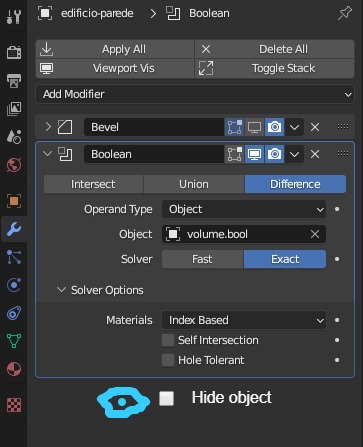
Option to hide object on Boolean modifier panel
Simple option, imagine you could directly hide/unhide the object you are subtracting from in the modifier panel.
It would be cleaner and easier to check if a certain boolean operation is hidden or not.
Both option to hide in viewport and render.
If you don't agree, please explain why. Thanks!
4 Comments
I don't think it would be cleaner. People will expect this to either override or be overridden by the object's own visibility settings, and people will therefore be confused when an object isn't acting as they expect.
I'm not so sure about it. But ok, so I have another idea, show in the modifier panel an icon saying if the object is hidden or not, for viewport and render.
Modifier list addon adds some visibility options to booleans (it's just a reference to existing properties of these objects):
It does a lot of cool things actually, for example easier creation of empties for modifiers which need them to work (like simple deform) and their auto parenting, direct access to their coordinates and more:
Almost makes you forget that blender doesn't have widgets for modifiers and empties management is super rudimentary... Unfortunately most of these cooler features are built around old modifiers interface and are missing if you use modern list layout.
It's an interesting idea, and I can see the use case, but it would break the design of Blender to have modifiers be able to modify other objects. That would quickly become quite confusing. To find what's causing an effect on an object, you'd not only have to look through all of its properties and modifiers, but also all the modifiers of every other object in the whole file.