← All ideas7 Aug 2018RockbardOpenUser InterfaceRockbardCyanBCDraiseLuis.BurdalloWilco.Wilbrink___me2abdulrhman.asamiarunbharathi555belimlinbnzscanapylbbddinhddoongdpdpforlifeehabcharekfinnlheinemanngraehujuangabriel.arzolakalidemleotournlsscpplucianomahesh0806pitiwazourengglirodrigostelesthecavelaptintwotin
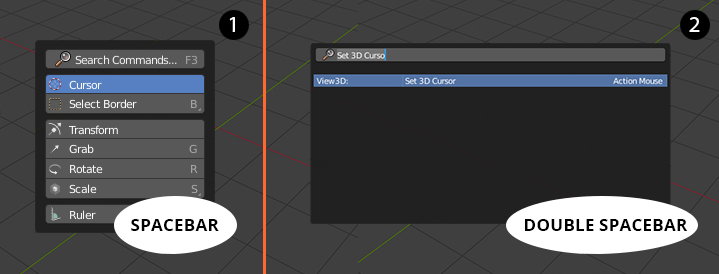
First spacebar press calling the menu and second press returning the search bar
96.3%
Development Status:
Open
Upvote26Downvote1
R
Rockbard
7 Aug 2018
16 Comments
l
luciano
or screw that stupid menu and have the spacebar be search again
4
R
RockbardAuthor
@Luciano Muñoz:
Hah, yeah I don't find it "cool" either
2
D
Darknoodles
*
@Luciano A. Muñoz Sessarego
* You can get it back by going into the preferences/keymap and set "space bar action" to "Search" (and of course Right click to select ;) )
1
_
___me2
it would be most simple if the spacebar menue would stay but the Button "Search Command F3" would change to a textfield with a blinking cursor - as soon as one types the searchresults replace the buttons Cursor, Select Border, transf... etc. - its less clicks for everyone - yes there might be a window-Size problem with the searchresults but that is optics and i dont care about that as much as fast workflow
2
R
RockbardAuthor
@___me2:
Nice idea
b
bruno.berger
@___me2:
Nice idea but will not work except shortcuts would be disabled.
_
___me2
@bruno.berger:
mhk i see - one somehow cant make it work for everyone - new users (maybe) want buttons - old users need fast interaction, or at least something that behaves as fast as 2.79 did - i for one would disable the shortcuts on that menue only, so i could type - what other use have the buttons than to click on (without shortcuts) - however, i will learn the new way should there be one
b
bruno.berger
@___me2:
I totaly agree with you and I'm also the kind of guy who likes the fast way with shortcuts.
So I support your idea, it would just not working right now. But let's hope somebody of the development team takes your proposal, or the idea of Buster Friendly, into consideration.
b
bruno.berger
Great idea! Simple and fast.
_
___me2
just combine it - i dont like it myself it hinders ... combined would be a compromise for new and old users - just have the tools on the left and the search directly on the right...
_
___me2
@___me2:
the cursor should be active in the searchfield for immediate writing
2
R
RockbardAuthor
@___me2:
Thats could be one of the options. Nice idea.
s
sidartalei
Cursor is always placed at the last option tho.
_
___me2
@sidartalei:
aargh well, then lets place the searcharea at the bottom - i could very well live with that.. main thing: search fast without looking or clicking some extra button ;)
m
mahesh0806
@___me2:
yes, we should be able to type immediately once the search menu appears. Only thing is that the other shortcut keys should be inactive during the search.

16 Comments
or screw that stupid menu and have the spacebar be search again
@Luciano Muñoz: Hah, yeah I don't find it "cool" either
* @Luciano A. Muñoz Sessarego * You can get it back by going into the preferences/keymap and set "space bar action" to "Search" (and of course Right click to select ;) )
it would be most simple if the spacebar menue would stay but the Button "Search Command F3" would change to a textfield with a blinking cursor - as soon as one types the searchresults replace the buttons Cursor, Select Border, transf... etc. - its less clicks for everyone - yes there might be a window-Size problem with the searchresults but that is optics and i dont care about that as much as fast workflow
@___me2: Nice idea
@___me2: Nice idea but will not work except shortcuts would be disabled.
@bruno.berger: mhk i see - one somehow cant make it work for everyone - new users (maybe) want buttons - old users need fast interaction, or at least something that behaves as fast as 2.79 did - i for one would disable the shortcuts on that menue only, so i could type - what other use have the buttons than to click on (without shortcuts) - however, i will learn the new way should there be one
@___me2: I totaly agree with you and I'm also the kind of guy who likes the fast way with shortcuts. So I support your idea, it would just not working right now. But let's hope somebody of the development team takes your proposal, or the idea of Buster Friendly, into consideration.
Great idea! Simple and fast.
just combine it - i dont like it myself it hinders ... combined would be a compromise for new and old users - just have the tools on the left and the search directly on the right...
@___me2: the cursor should be active in the searchfield for immediate writing
@___me2: Thats could be one of the options. Nice idea.
Cursor is always placed at the last option tho.
@sidartalei: aargh well, then lets place the searcharea at the bottom - i could very well live with that.. main thing: search fast without looking or clicking some extra button ;)
@___me2: yes, we should be able to type immediately once the search menu appears. Only thing is that the other shortcut keys should be inactive during the search.
@___me2: YES