
Proposal: Re-purpose the default Alt+Middle mouse drag for timeline scrubbing
Problem
Currently the
modifier keys + middle mouse drag
are exclusively used to manipulate *
space
* in the viewport (zoom, pan, roll(?) and rotate). However I don't feel the current implementation of
alt + middle mouse drag
(view axis snap) mouse drag is intuitive. While incredibly useful, I feel it's better suited as a 'snapping' augmentation to the rotate viewport operator (invoked with
rotate modifier + middle mouse drag
then
ctrl
while rotating).
Proposal
I propose
alt + middle mouse
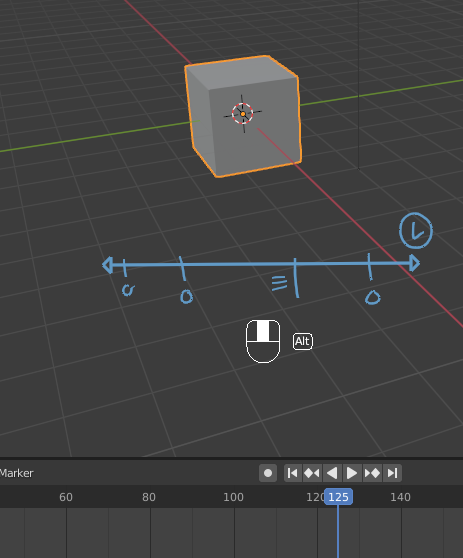
should invoke an operator dedicated to easily manipulating *
time
* in the viewport instead. This will create a more intuitive approach for animators to scrub through animations while posing and opens up possibilities of keeping their focus in the viewport rather than context switching or moving their hands from one side of the keyboard to another.
Reason
-
alt + middle mouse scrollmanipulates the timeline in increments, butalt + middle mouse draginvokesview axisand on top of thatalt + middle mouseinvokescenter view to mouse. None of this is consistent. I believe the pan operator should invoke center view to mouse and rotate view should invoke view axis through modifier keys. -
modifier + middle mouse scrollused to adjust viewport navigation similar to the currentalt + middle mouse scrollfunctionality for timeline. Not sure why that was removed in the default keymap for 2.8+ but that's a different proposal... - While scrolling the middle mouse is helpful for small increments a modifier dedicated to large scale timeline manipulation in the viewport as a first class citizen would greatly help animators flip through frames.
- Having people reach all the way to the arrow keys to manipulate the timeline increases hand strain and fatigue.
-
When animating with a tablet not many animators have access to a scroll wheel so
alt + middle mouse scrollisn't possible or hard to use without a special macro/hardware. However many map middle mouse to one of their pen buttons making this a viable and faster alternative. - This opens up possibilities for extra animation functionality in the modal operator.
Implementation
I've created a small add-on that implements a timeline scrubber operator in the viewport.
-
It mimics the functionality of
alt + middle mouse scroll- (stops at the start frame, doesn't stop and end frame)

-
Implements keyframe snapping (with
ctrl) - works with current action on 3d object or current layer on greasepencil stroke

-
Implements keyframe insertion (with
alt + middle mouseand no drag offset) - Needs active keyset set first

Unfortunately I don't have a clean way of overwriting keymaps and restoring them so the operator keymap has to be set by hand until I figure it out:

It's still in development so it might have some bugs. I'd love to hear thoughts and opinions. I also realize this should work on multiple contexts other than just the viewport (timeline, dopesheet, shader graph, compositer, vse) and will add that functionality when I have some time.
0 Comments