
Output Color-Space Previewing on Compositing Viewer Node
What:
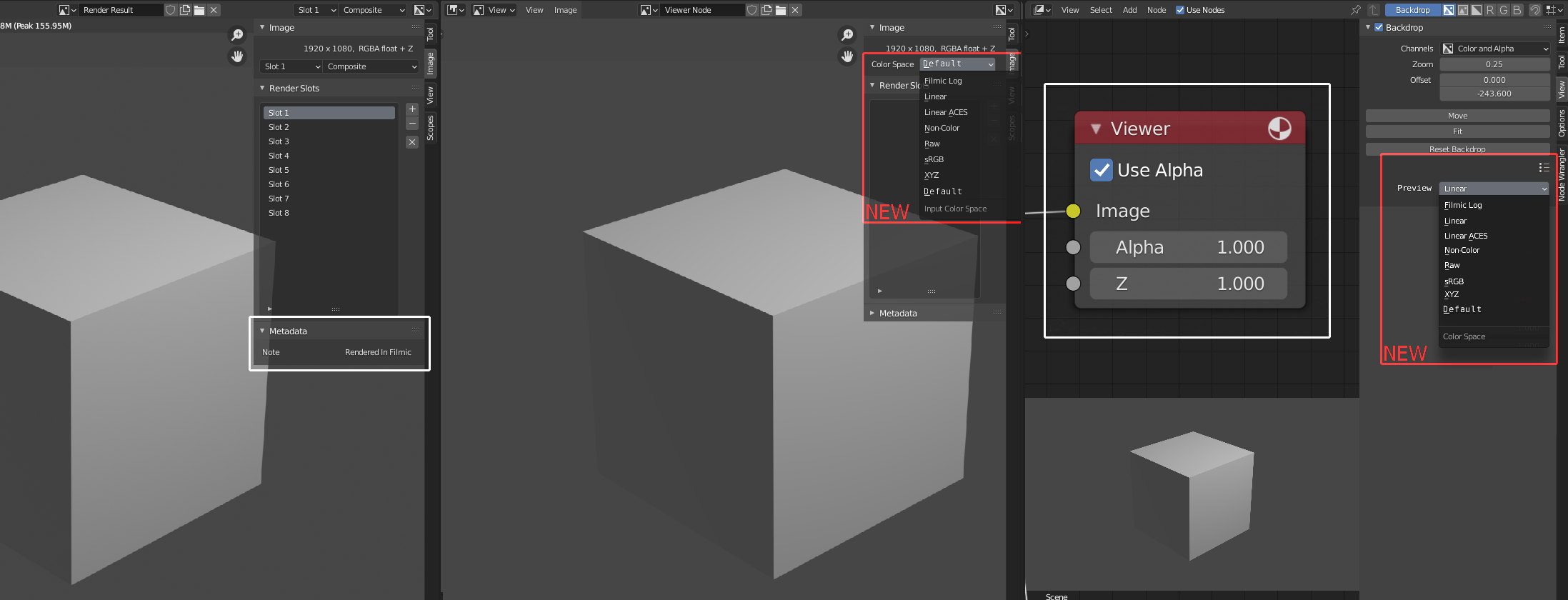
I'm speaking about view properties that portray in real-time how your compositing will look in it's destination color settings. The default setting will assume your scene color-space for maintaining predictable functionality for existing users.
All manipulations done in 32 bit, while seeing the final colors alongside our working window. Adjusting the final look of our output will become easier since we can visualize how our adjustment effects the final image, live.
I believe that this will relieve so much confusion for people struggling with color-management.
Why:
Color management is more powerful when the viewer has clear perspective on it.
Color-space auto corrections are currently off the table, so we really do need to see that final image without jumping through hoops.
less rabbit warrens of color management theory and endless tug of wars between input and output contrast.
Current work-arounds:
This functionality already exists in Blender, but not in a live manor in compositing.
The best way is to open the output image and hit alt-r to refresh the view after rendering.
You can also run a filmic render into the VSE in standard RGB, but this requires the user to hop between scenes which can be slow on heavy projects. Some prefer a purely nodal approach.
What next?
I think we should start with an addon so that people can try it out.
Perhaps in the future, you could link an output node to an image view to simulate the default treatment of colors in that format.
-S
1 Comment
Now we have the save as render on the compositor output so we can preview the final look.