
Few options for better nodegroup layouts
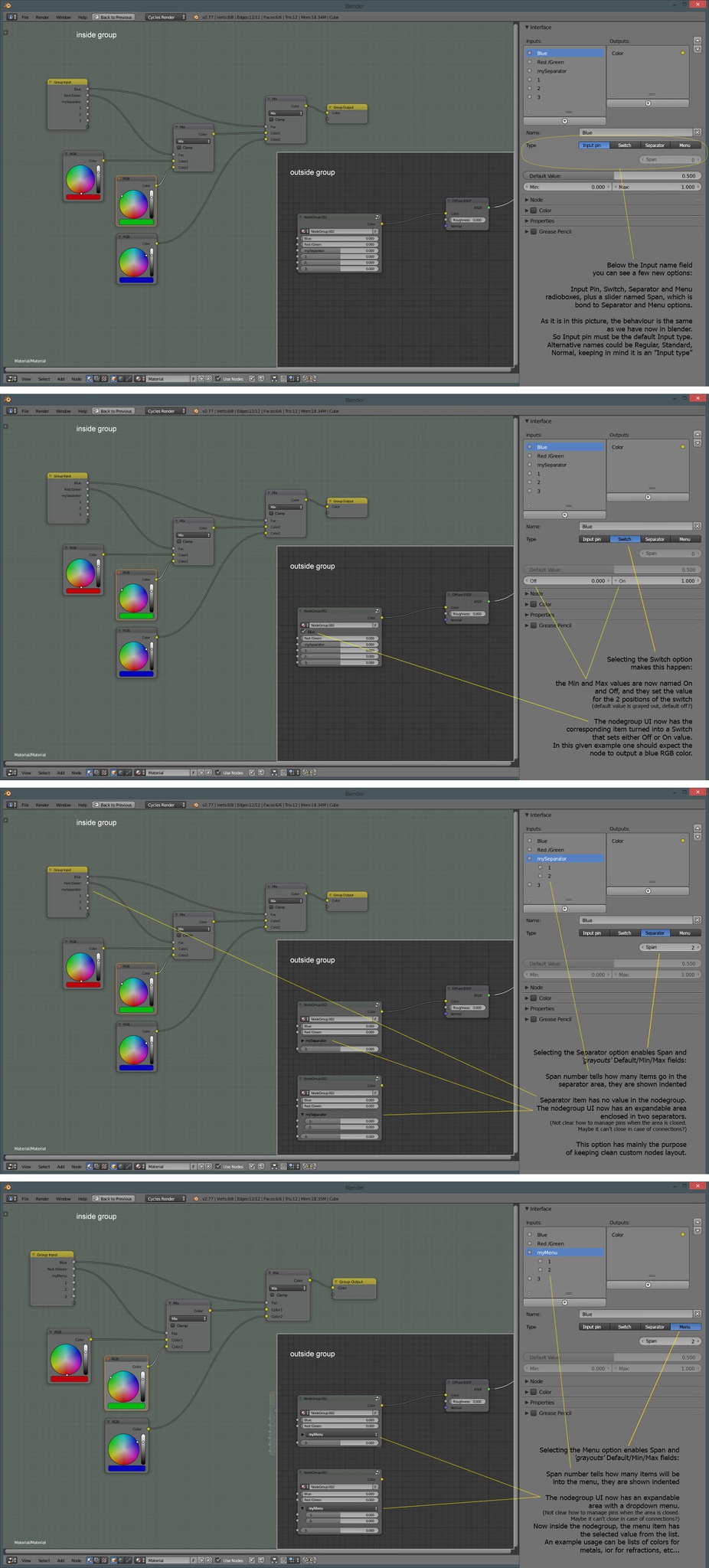
Nodegroups are great! They expand the node concept in powerful ways. For example you can setup a complex material in cycles and make it resemble a material from the good old Blender Internal render. Well, quite . A few options are missing still, to be able to build complex but clean interfaces. Here I present my mockup for enhancing nodegroups. I wrote everything in the pictures, hoping in this way to make clear what i wouldn't be able to explain in plain text ;)
edit: sorry for the huge pic. I should at least make it <1920px width EDIT3: an addition to this design: tooltips! ( rightclickselect.com/p/ui/8qbbbc/nodegroup-tooltips )
EDIT2:
as i said, here is the updated Switch mockup:

9 Comments
I can't tell you how many times I've wished this was possible, it would be a great addition to blender's node groups
Quite interesting, i really like it, except one thing: The Seperator and Menu options seem to do the same thing. In my opinion the dropdown menu should work like any other menu in blender, so choose between different options. Might be useful for example to choose between different setups in an uber shader or things like that.
I see. This is what i hoped. So it would also be possible to use a switch value as a menu entry, which outputs a value of 0 or 1, right?
If i understand you correctly, yes, the switch itself outputs 0/1 (or whatever value you assign to off/on states). This would allow to, use-case example, enable "anisotropic glossy" on a shader, and see the two parameters "anisotropy" and "rotation" appear below. With the correct wiring inside the nodeyou get a compact and smart nodegroup that only shows the needed sliders and inputs. A dream for ubershader builders out there!
The menu itself outputs the value chosen from the "span list"
The switch functionality is awesome, also are the others. I think it could make group nodes even more exciting to share!
What would be the reason to hide a switch? Maybe I should wait your update before asking, hahaha.
Ehm... That was my intention, but I couldn't figure out how to add more than one picture
You'll have to host the images off-site (imgur or pasteall, for example), but once you do that, you can show them individually using Markdown.
It may be better if you could post each of these 4 images individually. Auto-zooming in browsers tends to make them hard to read when I click on the one image.