← All ideas14 May 2019FudushaeOpenUser InterfaceFudushaeAndrewGulevCandleCometCoBCoruzyakDraiseEzyPolyFalconCreatesHokussIIIFGIIIMickHanksNinKorrRetniBewreRoadkillSPYReoxShimoonSunbeamTiggisVyachalan.zirpoliandycuccarobestelixbnzscarl.erik.tengesdaldanielpaulus90ferranmartinezclargiuseppe.bufaloluja19momotron2000mrpnanomanprono4mepablovazquezpolycultureromanvolgushev4565sineotheis.lolweis3dximarix
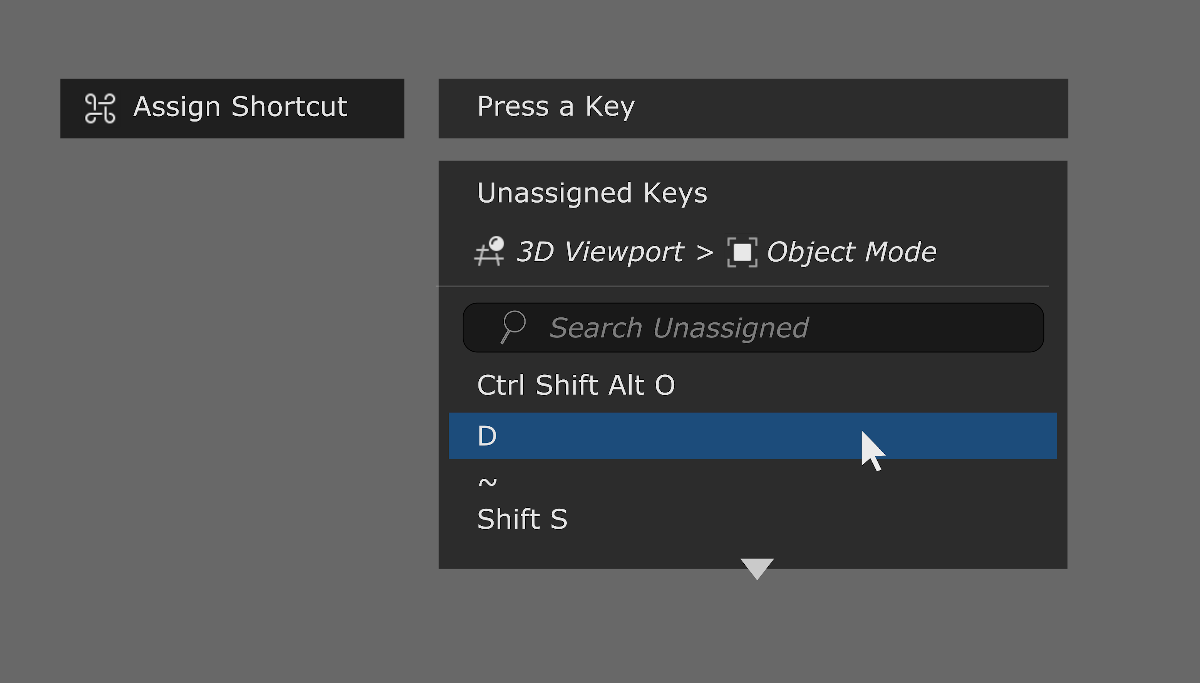
Good to quickly assign & see what keys are free to use on the fly.
84.4%
Development Status:
Open
Upvote38Downvote7
F
Fudushae
14 May 2019
11 Comments
I
IIIFGIII
" Unassigned " shortcut can be anything ....show thousands maybe millions of variables for what?
What need to show is a message which tells that pressed keys was already used and maybe button to go straight to this assigned operator in preferences to be able reassign it to something else.
4
B
Blender_Bob
Maya displays a keyboard showing you what is available. It's dynamic so if you press CTRL, ALT or CMD, it will highlight the ones already taken. Im Maya you can't have hotkey conflict as you can't use the same hotkey twice in the same context. I made a snapshot but I don't know how to insert an image on this web page.
3
V
Vyach
*
@riouxr
* drag picture into text area, it will be uploaded.
1
B
Blender_Bob
*
@ Vyacheslav
* I tried but it doesn't upload. It seem to work when you post something for the first time though
f
ferranmartinezclar
How about displaying information related to user input?
Let user type in first.
If they type an unassigned key/combo, an "assign" button pops up (or a "press enter to confirm" message).
If the input is already assigned, display the relevant information per operator assigned, possibly with an "unassign" button?
1
j
jason
The list of unassigned keys could be
really
long... and it's dependent on context. The key could be assigned in one editor, but not necessarily in another. What would display in the list in that case?
1
p
pablovazquez
Exactly. The list of unassigned keys is literally hundreds of combinations with/without modifiers.
2
D
Draise
The best way is to have a system that just says if the hotkey is already taken (try another), or have it assign no questions when available when you try assign.
1
t
testure
*
@Jason van Gumster
* Yeah, this is a real problem. Honestly I think this suggestion is trying to treat a symptom of a larger issue- the input manager in blender kinda sucks. It's serviceable, but if you're trying to set more than just a couple of basic hotkeys you're in for a real fight
would it not be a good idea to have some source where user key maps could be published and ranked by popularity. This would allow flexibility but some standard layouts might emerge.

11 Comments
" Unassigned " shortcut can be anything ....show thousands maybe millions of variables for what?
What need to show is a message which tells that pressed keys was already used and maybe button to go straight to this assigned operator in preferences to be able reassign it to something else.
Maya displays a keyboard showing you what is available. It's dynamic so if you press CTRL, ALT or CMD, it will highlight the ones already taken. Im Maya you can't have hotkey conflict as you can't use the same hotkey twice in the same context. I made a snapshot but I don't know how to insert an image on this web page.
* @riouxr * drag picture into text area, it will be uploaded.
* @ Vyacheslav * I tried but it doesn't upload. It seem to work when you post something for the first time though
How about displaying information related to user input? Let user type in first. If they type an unassigned key/combo, an "assign" button pops up (or a "press enter to confirm" message). If the input is already assigned, display the relevant information per operator assigned, possibly with an "unassign" button?
The list of unassigned keys could be really long... and it's dependent on context. The key could be assigned in one editor, but not necessarily in another. What would display in the list in that case?
Exactly. The list of unassigned keys is literally hundreds of combinations with/without modifiers.
The best way is to have a system that just says if the hotkey is already taken (try another), or have it assign no questions when available when you try assign.
* @Jason van Gumster * Yeah, this is a real problem. Honestly I think this suggestion is trying to treat a symptom of a larger issue- the input manager in blender kinda sucks. It's serviceable, but if you're trying to set more than just a couple of basic hotkeys you're in for a real fight
* @testure * agree with you. I already suggested strict search blender.community/c/rightclickselect/jKcbbc/ in manager and striped rows. blender.community/c/rightclickselect/CDcbbc/
But message about used key is necessary too!
would it not be a good idea to have some source where user key maps could be published and ranked by popularity. This would allow flexibility but some standard layouts might emerge.