
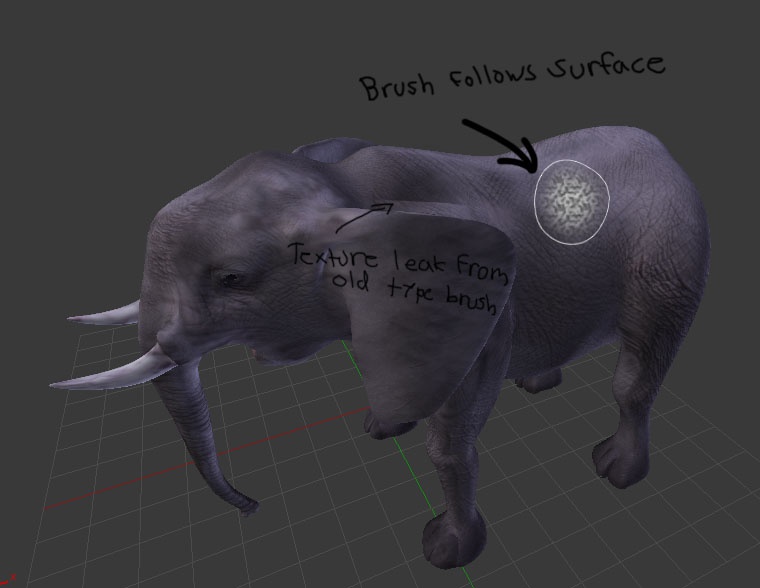
Make brushes following the mesh surface
This is one key feature that might help texture painting and sculpting very much. When you paint or sculpt some small areas, if the brush follows the surface it helps you to be able to prevent all kind of leaking from your brush to the areas where you don't wanna paint. Now you don't need to use masks so much, since the system takes care that you cannot shoot the paint too far away from the area you are painting.
No more sharp lines behind corners or leaking color to wrong areas.
9 Comments
There used to be a feature like this during some early sculpting improvements. However, it was never included in master because it had a pretty adverse effect on performance while sculpting and painting. However, after we a get a few of the planned improvements to the 3D View (including OpenGL upgrades), it would certainly be nice to revisit this feature.
I really hope it will happen. :)
That really would help a lot. In painting, cloning.. everything. Have always wondered why Blender doesn't have that. Seems to me it shouldn't be that hard to do, proportional editing basically does that with vertices.
Yes... YES.....
Something like the tangent-wrap brush alignment of Substance Painter? Would be a really useful feature since that kind of leaking happens very often.
Normal projection has been implemented in 2.8 for weight paint and vertex paint (it was already there for sculpting in 2.79). Texture paint is still missing it afaik.
It seems the brush circle doesn't display in 3D in any case yet though.
I would also really like there to be an option to disable normal projection. It's a great feature but there are cases where I want to project from the camera.
Is there any news about this? This will improvove the abillity to paint textures in blender
This feature is done. Its in 2.81
* @Craig Jones * well if its coming for sculpt i don't see why it wouldn't also be implemented for texture painting.