Those windows are meant to be in the space of the operation that created them. Transforming in the viewport creates an adjust window in the viewport space, same for the timeline. You can always pull the timeline window up to make space for the popup window.
1
M
Mariavivi
It is necessary to create a menu for precise parameter control after performing keyframe transformations. There is no better solution than placing this window within the current view.
1
L
Lauloque
Hi, this is a FOSS community, people spend time and money making a good piece of software, and both its releases and its development process are made available to you at no cost. When you post a feature proposal, think about those people on the receiving end. There is no need for being aggressive, and you have all to gain in showing friendliness and openness. But when your post reads more like a gratuitous jab than a genuine feature proposal or a discussion opening, there's no wonder why people just downvote and move on.
But you could edit your post to help that! Maybe explain better what is the issue is exactly, then propose one or several ways to help fix it.
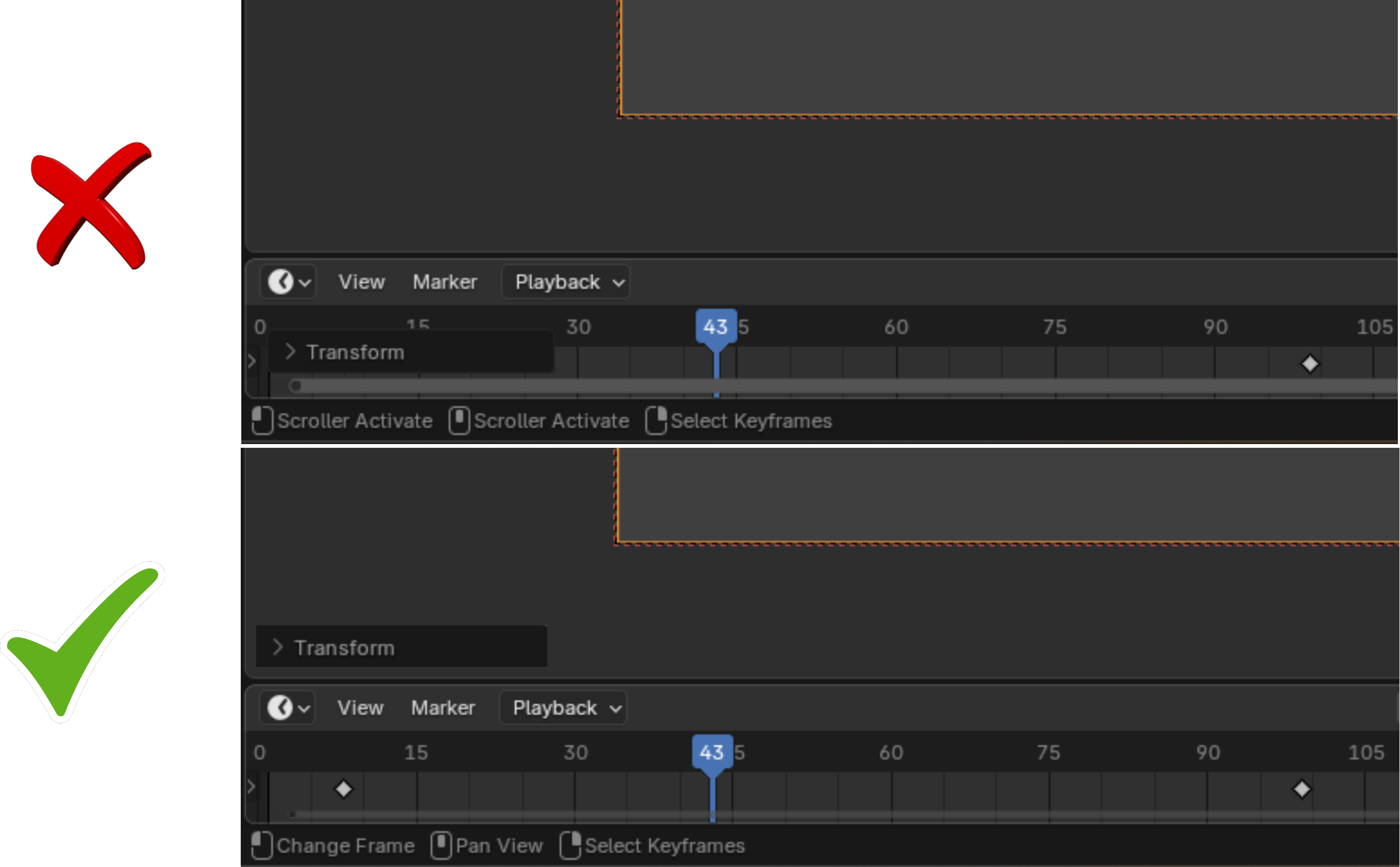
From looking at your video, to me it looks more like what you point out isn't particularly that the Transform operator's options panel (called the
Adjust Last Operation panel
but I will shorten it to ALOP) shows up in the timeline, but that the ALOP can get in your way by appearing over what you work on and cover stuff. That's a good point to tackle!
As to why the ALOP shows up in the editor you run the operator from, I guess there are multiple reasons:
Every editor has its own operators. Operators that are seemingly identical across some editors still depend on the context of the editor.
From a programming perspective, you can't expect with certainty that any other editor is open for you to be able to program the ALOP to show up there instead of the current editor. And trying to program each plausible case in which you could show that panel elsewhere and in a way that doesn't "get in your way" would get tricky very quickly.
E.g. here you want it in the viewport, but if you have multiple of them, which one do you choose? Or when you have no viewport at all, such as in video editing? Or, when you have a viewport that's so far away from the timeline it would make the panel pop outside of your visual working area or make you go back and forth unnecessarily with your mouse?
And if you add some conditional rules like that, then you add inconsistency. How do you teach it to users? I bet my coffee that no matter how much logical and easy you would see the ruleset, a lot of users (if not most) will see it as a magical random location.
Another idea that was brought up a while ago was to have the ALOP always show up in the same place relative to the window instead of the current editor. At least it's always in the same place regardless of what you do or your GUI layout, but then again, it still covers parts of the GUI all the same, if not more depending on the current GUI layout.
Therefore, the ALOP shows up in the editor you are running the operator from. That's a simple solution that tackles most these scenarios in one go and is easy to understand and get around if it gets in your way a bit.

4 Comments
Those windows are meant to be in the space of the operation that created them. Transforming in the viewport creates an adjust window in the viewport space, same for the timeline. You can always pull the timeline window up to make space for the popup window.
It is necessary to create a menu for precise parameter control after performing keyframe transformations. There is no better solution than placing this window within the current view.
Hi, this is a FOSS community, people spend time and money making a good piece of software, and both its releases and its development process are made available to you at no cost. When you post a feature proposal, think about those people on the receiving end. There is no need for being aggressive, and you have all to gain in showing friendliness and openness. But when your post reads more like a gratuitous jab than a genuine feature proposal or a discussion opening, there's no wonder why people just downvote and move on.
But you could edit your post to help that! Maybe explain better what is the issue is exactly, then propose one or several ways to help fix it.
From looking at your video, to me it looks more like what you point out isn't particularly that the Transform operator's options panel (called the Adjust Last Operation panel but I will shorten it to ALOP) shows up in the timeline, but that the ALOP can get in your way by appearing over what you work on and cover stuff. That's a good point to tackle!
As to why the ALOP shows up in the editor you run the operator from, I guess there are multiple reasons:
Every editor has its own operators. Operators that are seemingly identical across some editors still depend on the context of the editor.
From a programming perspective, you can't expect with certainty that any other editor is open for you to be able to program the ALOP to show up there instead of the current editor. And trying to program each plausible case in which you could show that panel elsewhere and in a way that doesn't "get in your way" would get tricky very quickly.
E.g. here you want it in the viewport, but if you have multiple of them, which one do you choose? Or when you have no viewport at all, such as in video editing? Or, when you have a viewport that's so far away from the timeline it would make the panel pop outside of your visual working area or make you go back and forth unnecessarily with your mouse?
And if you add some conditional rules like that, then you add inconsistency. How do you teach it to users? I bet my coffee that no matter how much logical and easy you would see the ruleset, a lot of users (if not most) will see it as a magical random location.
Another idea that was brought up a while ago was to have the ALOP always show up in the same place relative to the window instead of the current editor. At least it's always in the same place regardless of what you do or your GUI layout, but then again, it still covers parts of the GUI all the same, if not more depending on the current GUI layout.
Therefore, the ALOP shows up in the editor you are running the operator from. That's a simple solution that tackles most these scenarios in one go and is easy to understand and get around if it gets in your way a bit.
yall who downvote gotta explain yourselves.