
"Smart Copy", Avoid Duplicating Data Unnecessarily During Appending/Copying
Problem / Use Case
Imagine you're working on a render of a large office scene.
You spend some time creating the office layout, the walls, etc.
Next step? Start populating the scene with assets from other Blender files, appending them, or opening the blender scenes to select them, then copy/paste into your current scene.
You start appending (/ copypasting from another open .blend scene) assets. For example, you might start appending pot plants, some office desks, window curtains, lights, etc.
A lot of these assets you've created might use the same materials. For example, you might have a common material for a type of metal you use throughout all of them.
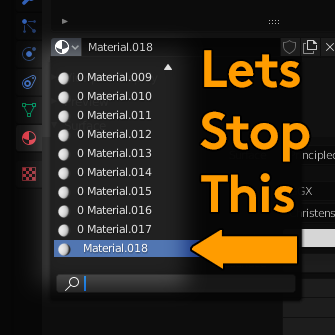
Right now the way Blender currently works, if you append (for example) a chair that uses the 'Black Metal' material, then append from either the same or even a different file another chair that uses also 'Black Metal' material, during the appending process a new Blender material will be created called 'Black Metal.001' with a duplicate copy of the same material.
Two copies of the same material, same data, but no longer linked, using double the amount of memory, and the only way to fix this currently is to use an addon that does a search and replace of Black Metal.001 for Black Metal.
This really isn't desirable.
But it is Blender functioning more or less as intended, because how is Blender meant to know two materials with the same name are indeed the same material?
Feature Proposal
But what if Blender DID know they were the same material?
What if, during the appending process, when Blender detects a material that has the same name as an existing material, it did a 'deep copy' comparison of the two materials? Checking to see if they have identical data inside of them. Every node, value, setting, property, list, exactly the same.
If they do share identical data, then Blender could choose to not create a duplicate of the existing data and just use the existing material that's already present.
If they don't share identical data, then Blender could then logically create the duplicate 'Material.001' copy with the different data, which would be desirable behaviour in that case.
This behaviour could be extended to other types of data as well, other than just Materials. Such as mesh data, or animation data, etc.
This could be an optional behaviour that could be enabled in Blender's Preferences under the Editing tab, or under Save & Load.
(But I can't imagine this would be a feature anyone would want to turn off in most situations to be honest, but you never know.)
13 Comments
I agree, this behaviour is a pain. How about just doing an MD5 checksum of the material as it gets saved? Then duplicate checking simply involves checking checksums.
* @pete.bateman68 * Yup! It really could be as simple as that. MD5 the datablock, when a new datablock is appended with the exact same MD5 hash, don't append a new one with .001 on the end of the name, just reuse the existing one.
Not sure how practical it is to compare two materials to see what's Identical. You could achieve the same output with different node setups (A mix note at 80% for instance will produce the same result as the same node at 20% with its inputs reversed)
Perhaps if a material could be tagged with its file of origin so if it has the same name and same origin file, it can be assumed to be identical?
* @ammusionist * Well the idea wouldn't be to detect two materials that produce the same output with different node setups, that would be outside the scope of the feature. Just to detect two 'literally' identical materials with the same name. In such a situation, it would rarely (maybe sometimes who knows) be a logical or useful action to create a new duplicate material with the same exact node setup.
Look up " Linked Duplicates " in the manual.
(Settings for what to copy and what to link are in The Manual too!!)
(Update: Ah - You're talking about appended objects from other files! Fair enough - Good point.)
* @ammusionist * Yes but this is for appending objects from another Blender file, not for duplicating them within an existing Blender file.
* @ammusionist * I've altered some of my wording to my post clearer, sorry if my wording was unclear.
* @ Grady * Yep - Just got it!
Although - What if the material changes in the linked file? (eg: A shared workflow and your designer thinks your office chairs are too black, so adjusts his "Black" material.) Does that mean the linked material will automatically generate a new material as it's no longer identical to your own file's "Black"? Will it overwrite your "Black"?
* @ammusionist * The 'smart copy' would only detect identical data during the appending process, and skip duplicating the already present identical data. For a 'linked' material that would update each time the original material changes, you would still need to 'link' the materials rather than append them. So this doesn't really alter the linking workflow, more just a minor upgrade for the appending workflow.
* @ Grady * I think if you want all the objects to have the same materials, you should make the material in its own .blend and link it into each of them. Then when you link the objects, the links to the material will be respected and the material won't be duplicated.
* @Josephbburg * Joseph, please make an example of this procedure.
* @Josephbburg * I know that's an option but sometimes doing things the 'proper way' involves working backwards in terms of workflow. Imagine yourself in a situation where you haven't already linked all the materials to some other file for some reason, and then decide you want to copy and paste assets from one .blend to another. The only solution would be to then replace all the materials in both scenes with linked materials, a process that could take a considerable amount of time, probably longer than just copypasting the assets then manually fixing up any issues. Sometimes if the time constraints are too tight, there might not be time to even do that. The solution I'm proposing is just basically a nice 'convenience' feature to intelligently recognise 'Hey I shouldn't duplicate this data' while appending something.
* @ Grady * I have no problem with improving convenience. This is the sort of thing we really need that asset manager for. And a suite of Python scripts or built-in operators for shuffling data-blocks around and fixing broken links etc. Blender Animation studio uses something called "BAM" (Blender Asset Manager), but it's not documented very well, I've never heard of anyone using it outside of the Blender Animation studio.