
Material Browser Window/Panel
A window or panel that allows to watch and edit materials. The asset browser, introduced in blender 3.0 is a great start but compared to e.g. Cinema4Ds material overview - it is still far from good.
An additional panel could solve the following:
- quick overview of existing materials (without switching the outliner type)
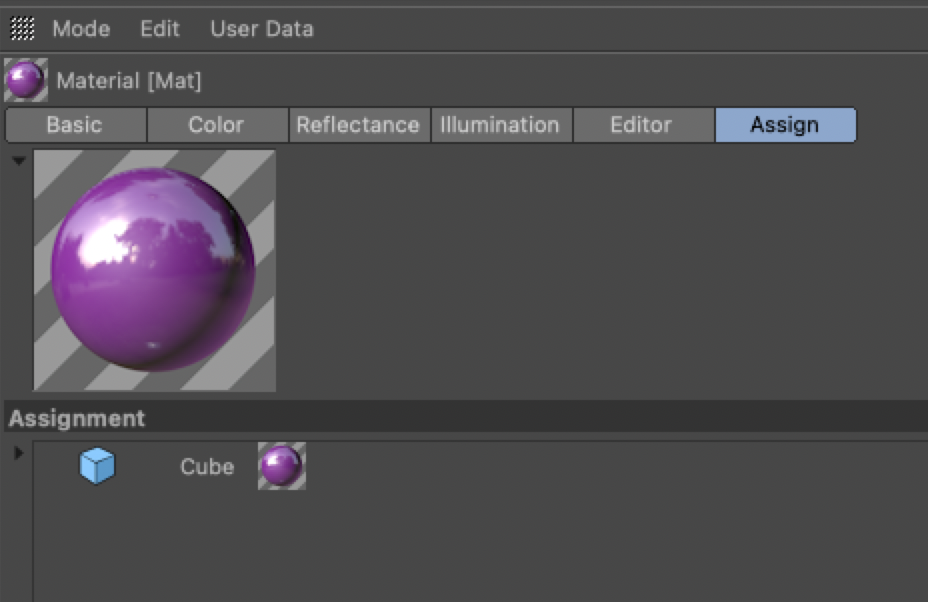
- quick overview of to which object a material is applied to
- place to edit a material
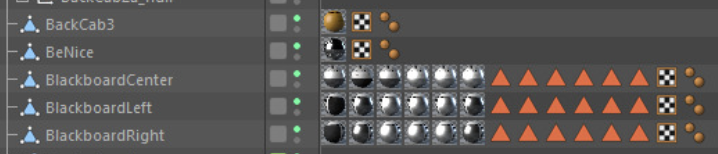
- even the hierarchy could show the applied material(s) on a higher level (not nested below a mesh)
- ...
Material Overview:
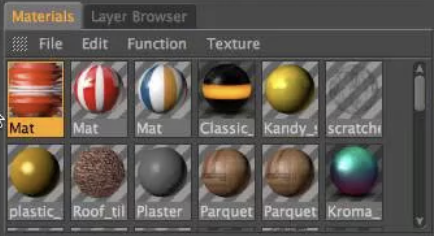
Material Directly Visible in Hierarchy:
Material Properties ( Assigned to):
5 Comments
YES 100%!!!
Blender has no way of visualizing materials except its god awfully small material icon next to the materials, which renders it useless...
Completely agree with you...
But i doubt it blender will implement this or address this issue...
I would like to propose the simplest thing that could work: adding a "material" option to the dropdown menu in the shader editor that currently contains: object, world, line style.
When "material" is selected, all materials in the scene are shown in the N side panel [1] and can be selected. The selected material is what is then shown in the shader editor. This thing would also change to show all materials in the scene, not just those on the currently selected object.
[1] There has recently been a lot of asset browser related work done in the N side panel for animation poses. Perhaps the devs can re-use some of that code to show materials in the N side panel of the shader editor.
To include pictures, please use the markdown code:
But yeah, that could be cool. Maybe a better name than "material" though, it's a bit redundant and not explicit. Perhaps "View All" or something crystal clear like that.
I agree. We need to see what we're choosing from.
better than nothing: blendermarket.com/products/materialpicker