
Allow Fit to View in Sculpt Mode and other modes.
The
view3d.view_selected
operator is called with
Numpad .
and is commonly used to frame your selection, but it doesn't frame anything if you're in Sculpt Mode, it simply centers your last stroke (no zooming in at all).
That's understandable, since zooming into a tiny little stroke you just made would suck but it also means we can no longer frame/fit the object we are currently sculpting to the viewport.
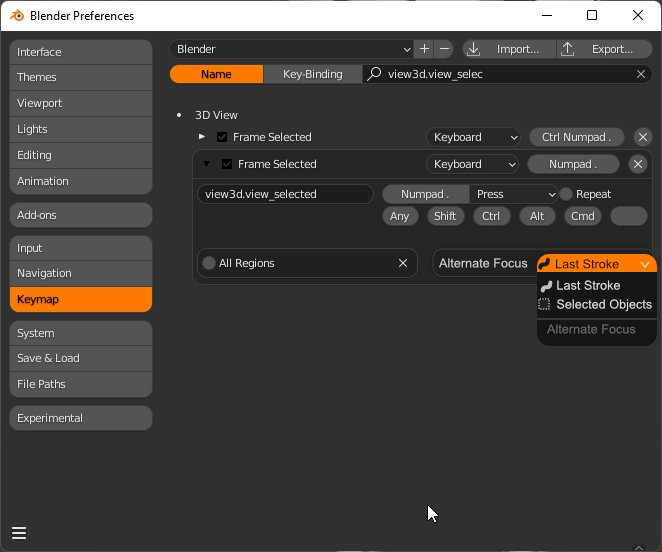
I propose adding another property to the operator (see mockup at the bottom) that allows switching behaviours when using Modes that have no traditional selections (sculpting, vertex painting, etc).
Call it "Alternate Focus" (for lack of a better name).
Maybe this new property has two options:
- Last Stroke (the current default).
- Selected Objects (could also call it Active Object or Bounding Box ).
That would make it really easy to create a separate hotkey for those cases where frame/fit to view is not available but still useful (sculpting is my favorite example).
--
Wait a minute, why not simply switch from Sculpt to Object mode, press Numpad . and then switch back to continue sculpting?
I tried that with a simple script, but the mode toggle operation can be really slow depending on your polycount, so it's far from ideal.
--
Mockup
2 Comments
use the home key... I tested this out, works pretty much the same as the frame selected
It's not the same. HOME key fits all your scene objects into view.
If you only have one object then sure, it works; but if you have a complex scene or a sculpt with multiple pieces it will zoom all the way out so that every single object is visible, instead of framing the single piece you are working on.