
Soft Edges displayed as dotted lines
It would be great to be able to display the soft edges of a mesh as dotted lines while keeping the hard edges as constant ones. At the moment you can see hard edges as colored lines but that doesn't take into consideration the mesh smoothing angle. I attached a picture of how Maya displays it, being a daily Maya and Blender user I really miss this option.
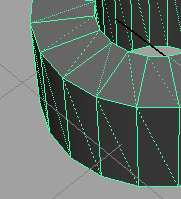
5 Comments
why not ? I personally find it obvious enough when edges are soft considering Blender doesn't show the wireframe on top of the shaded object contrarily to Maya (by default of course). I don't even know if Maya has an option to show the outline like Blender does.
@Caetano Veyssières: I'm not sure I fully understand your comment, but on planar surfaces is impossible to see if an edge is soft or hard, considering you have Wire + Draw All Edges active.
EDIT: I re-read your comment and understood your point. I mean this option as a debugging visual tool. Those cases when you have to go through a bunch of meshes (maybe even textured or unlit) to make sure they are production ready.
@pintorfj: Sure. In the mean time you can apply a Mesh Data Transfer modifier with Face Corner Data and Custom Normals enabled, targeting a copy of the object. This will apply the Auto-Smooth and allow you to highlight all the real sharp edges.
It might be helpful to explain what such an additional view option allows you as a user to do.
Also, where in Blender's UI would this be toggled? In the Display panel of the N region? Or maybe In Object Properties?
@Jason van Gumster: I work in the games industry in which is very important to keep vertex splits under control. Hard edges will produce splits in exporting so it is extremely handy to have that visual reference when modeling or cleaning up a mesh.
In terms of placement, I think the Display panel would make sense under Mesh Display or even under Shading, next to Backface Culling as we could display it in object mode as well.