
Option to Snap to Nearest Point vs Project from View
Currently, when snapping is set to faces, with "project individual elements" enabled, it snaps things to the nearest face projected from the view. This is annoying when things are supposed to be behind geometry, but snap in front of it.
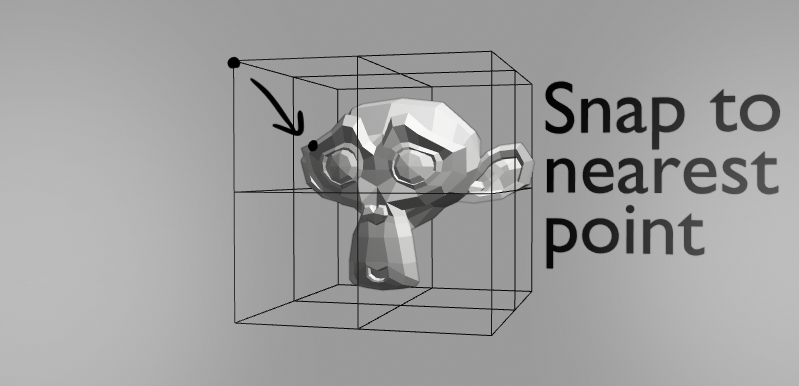
I would love an option for snapping that would change this behavior to something more like shrink-wrap. Things would snap to the nearest face there is to them , without projecting from the view. This would be similar to applying a shrink-wrap modifier after every manipulation.
Having this functionality could really help the retopology workflow.
7 Comments
I know exactly what you mean. The more I think about it the more I think this is a bug in the snapping option. I would expect project individual elements to project each individual vertex to the nearest face. But as you've pointed out they just get snapped to the front relative to the view. Try this for an example folks. Make a cylinder say, with another (retopo) object wrapped around it. Select a horizontal ring of verts on the retopo object and hit G, or S or R and the verts all snap to the front view projection of the cylinder (with individual elements selected in snapping options of course). This makes no sense to me.
If you just want " something like shrink-wrap" but with more control - try to assign to it some vertex group and then use Weight Paint to control it.
* @IIIFGIII * It would be like applying shrink-wrap to the selected geometry, but after every transformation . It's a hassle to use the shrink-wrap modifier for this, since one has to be added, set, and applied every time. On the other hand, using a shrink-wrap without applying it means that the geometry is rarely where it appears, which can make it hard to edit.
* @CandleComet * So it sounds like instead of modifier you want to have something worked like - each time you start transform (move, rotate, scale), for current selection start working
Shrinkwrapto closest something ( to closest what? modifier have three modes ) and when transform is done result of thisShrinkwrapwill be applied. Hmmm...Target- in modifier you set projection target object. How Blender have to know which one of object in scene is projection target? What if it was 5, 10, 50, 100 objects around, what if those object was too high poly? You just get crash because Blender each tick will try to find closest some point between all of this object?* @IIIFGIII * The proposal was intended as an option when Snapping is set to Face, so it would snap to the closest surface of any object. No target needs to be specified, just like "project individual elements." I'll try to clarify the post :)
As for performance, I haven't thought of that as any problem. If it is, perhaps it could be optimized, under the hood, to only consider nearby objects? Alternatively, if it turns out to really be a problem, the option should require a target to also be specified...
* @CandleComet * Performance ... you should thought about this before writing and not as a result of my questions.
So what exactly you suggested?
Limit projection snap to affect only those elements which is on front of projection target? Or limit projection snapping with something like " ignore backface elements "?
...This is annoying when things are supposed to be behind geometry, but snap in front of it....Or you want " something more like shrink-wrap " but not shrink-wrap?
.... I would love an option for snapping that would change this behavior to something more like shrink-wrap. Things would snap to the nearest face ...