
Remove file path of .blend file itself from .blend files
When a .blend file is saved, some information about the local file system is saved along with it, notably the directory path of the .blend file, which in my case would normally contain my username, which is derived from my real-life name.
I sometimes want to publish .blend files on the internet, but I don't want people knowing my real name. So currently I first either have to re-save the .blend file in a directory that doesn't contain my username, or scrub the information with a hex editor. I think it would be better if that information was not stored in the .blend file to begin with.
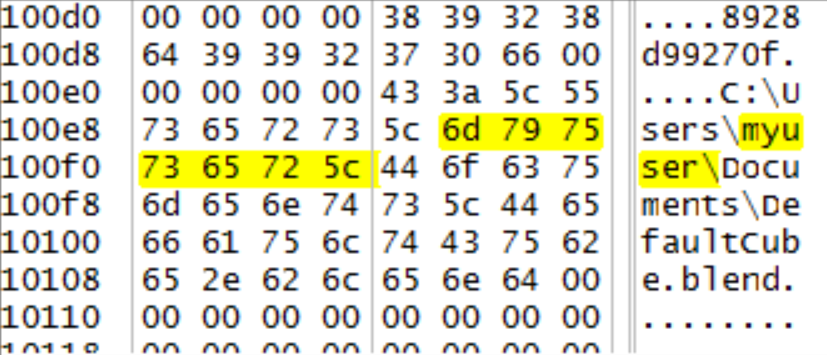
UPDATE 2018/03/05 - I have received some comments that theorize that the problem might be solved by switching to relative file paths for external files. The problem is that there aren't necessarily any external files. The current path of the .blend file itself is saved into the .blend file. For example, I just saved the default cube as DefaultCube.blend, and I've uploaded a redacted excerpt from the subsequent hex editing session as my "Custom Thumbnail".
10 Comments
because this is a file path question, how do you completely uninstall Blender? I seem to have a hidden file where the temp and data roam files are on my C drive. so everytime I reinstall blender I keep getting my same settings and addons .
@TRUE.DOMINIC: its probably in \Roaming\Blender Foundation\
hey, dougdigdag... if that is your real name...
i was going to suggest you download a file from someone else that they posted to blendswap and let us know if the path you find in it happens to be to the location on your own harddrive or someone else's but i just did it myself with a file i made at home here on my work comp.
the bpy.data.filepath in blender's console wasn't what you're seeing in the hex editor though.
it indeed had my home linux filepath in there. pretty sure R.Navega is right about what they're they're about 'cause i found a few of them listing different places. that had nothing to do with the file itself. one referenced some other files i had grabbed from blendswap in some mixed up file path i didn't actually have... it was really a mix between two separate paths in places i was storing things in. still did have my home comp username listed in the hex information.
Yeah, I believe that if you use relative paths, this shouldn't be a problem at all. Path information is critical to have (and have correct). Otherwise, if you're referencing non-packed files (.blend, images, etc.), how else would Blender know where to look?
Just use relative paths and a sensible structure for your project (i.e. keep all of your project files together, rather than linking to 7 different places on your hard drive.)
@Jason van Gumster: Thanks for your reply. See my update to the main post. In short, I doubt changing external files to relative paths would help because there aren't actually any external files.
@dougdigdag: I understand better where you're coming from now. That said, I still have this question: How would you have Blender handle paths if no path is there?
If I'm guessing correctly, what you're scrubbing is accessible from the Python API at
bpy.data.filepath. That path is used as the base path when determining all other relative paths (this is the reason why you can't use relative paths until you save the .blend file). So if this data isn't there, how would you propose that Blender reference outside data in .blend files?@Jason van Gumster: I've never done any Blender development, but obviously there must be some way for Blender to get the path of the current .blend file, because otherwise it wouldn't be able to write the unwanted data in there in the first place. I don't see any reason why it can't do that every session, and store it in memory rather than in the file itself. But, as I say, I'm not intimately familiar with the particular quirks of the Blender codebase.
@Jason van Gumster: I believe those paths are there in the file as a history of the last used files from the interface. It's completely unnecessary, but also a major privacy issue.
Does this still happen when using external data-pack all to .blend or make paths relative?
@3rton93: Thanks for your reply. See my update to the main post. In short, I doubt changing external files to relative paths would help because there aren't actually any external files.