
Let Drawing stroke thickness scale as low as 0 pixels instead of the current minimum of 1 pixel
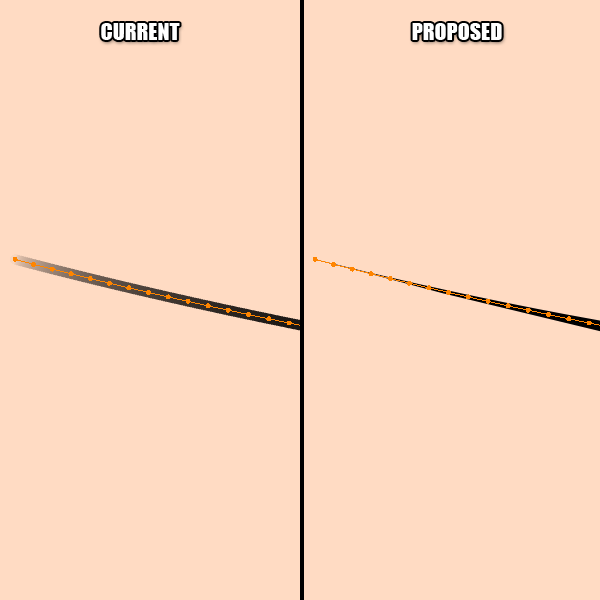
The current Drawing tools include various means of changing the size of the outline, such as "use curve to define primitive stroke thickness" while drawing Arcs, and the the Thickness brush in Sculpt mode. While this is useful for adding variety to a line, the current minimum size of 1 pixel is unnecessarily restrictive. This is most evident with curved lines made using the Arc tool with "use curve to define primitive stroke thickness" checked, as the start and end of each curve needs to fake it using alpha transparencies.
By changing the arbitrary limit of 1 pixel thick to 0 pixels thick , it would allow the user to hide arbitrary segments of a stroke (by scaling them to zero,) as well as allowing strokes such as Arcs with stroke thickness enabled to terminate in a true sharp point. (See thumbnail.) This would allow meshes derived from Grease Pencil to behave more like vector art both in Blender and when exported to another environment such as Unity. In addition, the user could now Draw shape with many arbitrary gaps in the outline as a single Stroke, meaning when points are moved in Edit mode, both the outline and the fill would be affected at once. (This alone would roughly halve the number of points that need to be edited when attempting to reshape a typical cartoon character after creation.)
In conclusion, the current minimum stroke outline thickness of 1 pixel provides no real benefit to the Blender user, whereas changing it to 0 would allow more work to be done by editing a single Stroke, a broader pallete of viable drawing techniques in general, and the creation of "true" sharp points on either end of arcs.
(If it turns out that other users find the minimum of 1 helpful to their workflows for some reason, the old functionality could be restored by allowing the Blender user to set the minimum thickness manually rather than changing it permanently to 0.)
(If a 1-pixel line that fades to 0 alpha is a desirable feature that just plain rasterizes better in renders, make the fade a seperate feature that kicks in whenever the minimum is greater than 0, or make fade tip/sharp tip a toggle)
3 Comments
Any news on this one?
This would be especially helpful. Currently when using the line art modifier I cannot get the desired look without values lower than 1... Or scaling the entire scene but that's hacky!
Note that as a temporary workaround, you can scale up the stokes by 10x in edit mode, then shrink the stroke in Object mode to 10%. This isn't ideal for every use case, but technically it's one way to let you make Points that look smaller than 1px, even though technically they still are exactly 1px.