
Ability to place section planes to cut a model
Currently, if you want to cut a section through a model, Blender offers the
Alt-B
feature, otherwise known as the
View Region->Clipping Region
feature.
This type of sectioning feature is extremely important for architectural modeling, and is used heavily in other applications in the CAD and AEC industry. The example screenshot shows SketchUp's section plane feature. Without this feature, Blender cannot be used to interrogate complex architectural, engineering, and construction models.
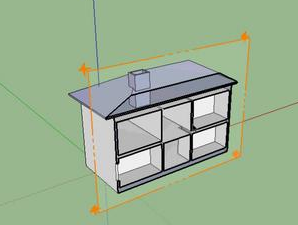
I propose for Blender to have a similar section plane feature, perhaps based on the
Alt-B
trick, but with the following improvements:
-
Alt-Bcurrently can only be applied by drawing a bounding box in the current view. Instead, it would be better to create an infinite plane object, similar to the orange plane in the screenshot above, which can be moved/rotated/snapped like a regular object to precisely place it where a section needs to be made. -
Alt-Bcurrently only makes one section cut. I propose the ability to create multiple section planes that can act together. For example, when dealing with a model of a multiple building, you often want to cut a section in many directions, sometimes known as a "section box" in other software. -
It would be good to be able to retain the section plane objects and toggle them on and off. The disadvantage of
Alt-Bis that after you clear it, it may be hard to recreate the exact same section. - (Nice to have) there should be a thicker line, perhaps with another colour, that delineates the cut model, similar to the thick black line in the SketchUp screenshot above.
- (Nice to have) it would be cool if it could somehow affect only a subset of objects / collections - so that some things are cut and some aren't, but I understand if this is prohibitively complex.
-
(Nice to have) it would be cool if this could be rendered too - a proper render, not just
Viewport Render Imagebut I understand if this is prohibitively complex.
Therefore, I propose in the
Shift-A
menu, a new object be called "Section plane". This creates a plane object, with its normal showing so you can see the direction in which it acts. In its object / data properties panel, there is a simple boolean checkbox saying "enable" or "disable".
To clarify, this feature proposal cannot be achieved using camera clipping planes, as they only work parallel to the camera view. It also cannot be achieved using booleans, as there may be thousands of complex objects in an architectural model. It also cannot be achieved using material shader tricks, since that only works during render-time, so is too slow - it may be faster with Eevee, but Eevee seems to lack a scene material override out of the box, so it is not easy to implement.
To clarify again that this is not the same as boolean:
Booleans apply to a mesh, which means that is impractical if there are 10k or more objects in the model (very common in architectural models), as it:
- has to be applied to all objects in bulk
- is very slow to compute, compared to an OpenGL solution
- does not act infinitely
- does not work on curve objects, or cull the viewing of non-mesh objects like lights
- with the current boolean implementation, also isn't quite stable depending the mesh topology.
- cannot be easily applied to linked models - which is also very common in architectural datasets, where architectural, mechanical, electrical etc are all separate models that get linked.
In comparison, Alt-B, which works through OpenGL, is instantaneous even on the largest of models.
18 Comments
I can't support this enough. Leading a arch team using Blender this would make modelling in buildings amazingly mucho grande easier! A thousand votes from me.
* @Ejnar Brendsdal * if you lead an arch team, you may be interested in blenderbim.org/ (disclosure: I am the primary developer) - which adds OpenBIM authoring capabilities to Blender.
The reason I mention this here is because I have just added a section plane feature to the add-on, using an Eevee shader override workaround. You can watch a demo here:
peertube.social/videos/watch/df53d014-2ae6-47ad-820b-792a81ea89a6
... or Youtube if you prefer:
youtube.com/watch
* @Dion Moult * how did I not know about this before, OMG
Slice plane from 3DsMAX. Miss it here.
Muito Bom, Parabéns!!!!
I'm a bit confused. How is this different from booleans?
***@Drax *** booleans apply to a mesh, which means that is impractical if there are 10k or more objects in the model (very common in architectural models), as it:
In comparison, Alt-B, which works through OpenGL, is instantaneous even on the largest of models.
* @Dion Moult * I see the point now, thanks for clarifying. However booleans are going to get refactored, so maybe it will use some of the mechanics you proposed
***@Drax *** Cheers - I had a chat with Howard Trickey, who I believe is working on the boolean changes and he agrees that this feature request is a different scope. But he did mention he wanted to add a boolean option for a single plane, so there would certainly be some similarities!
* @Dion Moult * Alt+B is very fast fast because it just alters the camera clipping projection . it would be very expensive, however to match the intersection points and "fill" the section with faces as to appear solid.
this is also a problem FreeCAD has been facing for a long time
you'd need some hacky solution like having a cross-hatched background which gets applied in some way using the depth vector and some clever compositing in order to have it still work as fast and as universally with all object types.
in the end it will actually look a lot different to a boolean and now I see why this feature would justify it's existence
edit: I see you's also like to have multiple section planes interact with eachother, this could present some problems when using the aforementioned technique, but they could be mitigated with some clever programming
An absolute must have feature for architectural use!
Architecture without sections
Any updates on this feature? is it in development?
I suggest that this function get the option to resemble the sections in Solibri as closely as possible. All other section views I've seen rely on manipulating a sort of origin, a point or a gizmo in order to affect the plane. If the model has any size to speak of, this then requires finding and maneuvering that origin a lot just to keep it in view. In Solibri one just finds a surface and clicks it to make the section parallel to that surface, shift-dragging the mouse in a direction to move the section. Where the mouse is when moving, and also where the section was created, is unimportant. Only the direction of the mouse movement matters.
Here is my add-on.
blenderartists.org/t/dynamic-slice-and-cap-add-on/1241686
Why doesn't a boolean with a big cube cover all possible use cases ?
* @meutzitzu * See my response to @Drax. I've also re-clarified it in the original post.
In summary booleans are slow, only affect meshes and not curves and lights, does not act infinitely, and doesn't affect linked models.
Sectional analysis is a wonderful thing, the next thing you'll want is cross-hatching.