
Visual queue in outliner for linked objects in different scenes
Case
The data linking system is amazing in Blender, but it's based heavily on mental memory. Which scene had the original linked object? Where is the original linked data? What goes from where to where? Where did this come from?
You need to either group always, then do a 2 step process to instanciate the group objects, THEN make local. Direct linking object data to and from scenes is... elusive.
The outliner is generally the world that helps arrange where linked data goes, how grouped data gets linked and where data generally is.
I know there are heavy updates to the outliner in 2.8 - but with that said... I have not seen any linked data visual queues updates yet.
Is there a possibility that any linked data that isn't from an original scene or blend file be colored something different within the outliner?
In the viewport, you can see linked group data, and not edit it, or make it into proxies.. but what about linked objects? As soon as you instance the group objects into the scene, these objects become like any other in the outliner.. and if you delete them, they delete from that scene, but you have no way of knowing if that object is original unless you cross reference data in multiple outliners.
There is no outliner visual feedback that objects were linked, or that they now are local. Nothing changes when you localize a linked object into an internal scene.
For example:
Within the same blend file -
- Scene.001 - object A
- Scene.002 - linked object A
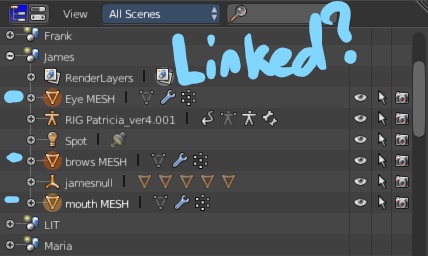
In the outliner, there needs to be a visual clue that Object A in Scene.002 is in fact linked data from Scene.001.
Unless they come from a group, there are zero visual queues.
Proposal
Create a new outliner colour highlight over any particular linked object/group/group instance - so you know it's NOT local, and so you know what to make local or not if you want to duplicate/append into a new scene/blend.
16 Comments
i like it. it would let you know at a glance some important information about certain objects.
@Josh Strawbridge: i like how you like your own proposal
@Luciano Muñoz: what makes you think it's the same person ?
@Luciano Muñoz: i like how quick people on the internet are to think everything is a conspiracy.
I think you mean cue rather than queue.
@Caetano Veyssières: using the correct word is nice and all but what do you think of the proposal?
@Josh Strawbridge: Using the right word in the title is not just nice and all, it's very important if you want people to even click to read the proposal.
As to what I think of it, why not, but you should use 2.8 in the mockup, even if it doesn't change your point.
@Caetano Veyssières: ... we both clicked on it knowing it was the wrong word.
@Josh Strawbridge: I clicked on it only because I would like to review as many proposals as possible in order to help. I didn't understand what the proposal was about by reading the title. Moreover, once this proposal sinks in the ocean of proposals that is this website, searching with keywords will be the only way for a potential interested user to find this. So those keywords should be spelled right.
@Caetano Veyssières: yea you're right about the keywords.
"queue" isn't really used with "visual" and while typing "cue" you still see "visual cue" a lot purely because that's become the common use term even though in type "visual" isn't specifically needed.
knowing that, it becomes easy to understand from the title. i see "visual queue" i think "visual cue" i see just "queue" i think "queue."
hahaha, thanks for the word correcting. For some reason I can't edit the document anymore to fix.
@ondraise15: ondraise15 and draise14 are not the same account, maybe you're trying to edit the post from the wrong one.
Also, why do you have 2 accounts ?
@Caetano Veyssières: I forgot my account from the original, and the password reset didn't ever arrive. Even to spam, so not sure how to recover the original.
@ondraise15: is it a blender ID account you're trying to recover or another type of account ?
@Caetano Veyssières: Blender ID. Reset password email never showed, not even in spam. Requested it twice.
Done in Firefox Quatum.
@ondraise15: The Blender ID infrastructure got updated recently (to allow change of username), so it's possible that a bug appeared. If you think there is a bug, you should file a bug report . In Tags, remove "BF Blender" and type "Blender ID", you should see "Infrastructure: Blender ID" appear. Click on it, then follow the instructions for the bug report.