
Blur slider for image textures
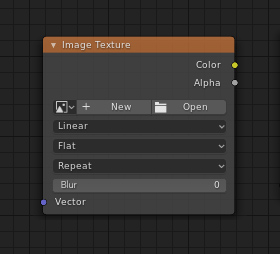
A lot of people already asked for blurring textures in the shader editor, and we've all learned that a pathtracer can't do that in an easy way. It may be possible in the future if a sort of "cache" node will be implemented. Until then, a possible "low hanging fruit" could be this approach. </br> (Something slightly different, not exactly a duplicate request.)</br></br> Sometimes you need a IMAGE texture (a real image, jpg png tiff etc) to be blurred for many reasons - like ease sampling, bump variations of a base pattern, making dof backplates - and it's unpractical/unelegant to have an original and many blurred copies (tries) of the image in your texture folder. </br></br>What I propose is a simple slider in the image node that triggers a gaussian blur on the texture BEFORE pathtracing. So in a very short precomputation time the texture gets loaded into memory with the needed amount of blur. Default would be 0 of course, then an integer would tell how large (in pixels) the blur should be.
15 Comments
A better solution would be a new composite node version or a new viewer node in Blenders compositor, that can be shared as a texture in the shader editor. This would serve the image blur topic and open dozens of new possibilities! By the way: This was already possible in softimage xsi 10 years ago, until Autodesk cancelled the app...
* @Christoph Werner * this is the best implementation indeed
* @Christoph Werner * agree. Mixing compositor with texture editor will be great!
* @Christoph Werner * People tend to forget that this is already sort of implemented with the "texture nodes," system. It's a legacy feature at this point that needs to be completely redone, but I think an overhaul would fit all of these requirements.
* @Christoph Werner * Still, the key here is "pre-computation pass"
* @ Lsscpp * Yes. I know, what you mean. Such things have always to be precomputed before the output is used for texture nodes or inside compositing.
* @Zach Hixson * The texture editor is definitely underrated and needs a soon overwork.
Although I like this a lot as something we should be able to do, I feel like this is trying to fix an entirely different issue in a limited way.
What you are proposing is a bitmap processing/generation action. This should really be tackled by a generative bitmap node tree. (think substance designer but simpler)
Adding a single option like this would complicate further development due to duplicated functionality when a bitmap node tree would be implemented.
* @Lapis Sea * Yes I know what you mean. That is why i referenced the motto "low hanging fruit".
not only for image textures, but for the procedural as well, in fact, there could be a separate node for blur, just like in compositing
* @uusamuel * afaik you can't blur in the pathtracing stage
The same way they convert shader to rgb, couldnt you manipulate the rendered pixels with the blur node?
Yes, it is needed.
It actually very easy to blur textures in path tracing by randomly sampling the UV coordinates. You take the UV coordinate that the image is supposed to have, then you add or subtract a random value that is multiplied by the blur amount. Since path tracing takes multiple samples, it ends up evening out into a smooth blur.
Mathematically it looks like this (assuming random is between 0-1):
In Cycles/Eevee it looks like the following: {attachment expng} The vector math nodes going into the White Noise nodes are to ensure that each XYZ value has a different noise seed, or else you would get a weird directional blur effect.
This could easily be implemented natively into a shader node and would probably be more universal than an option in the image node.
* @Zach Hixson * The noisy coordinates trick is a well known one, but it adds computation to the render. And the times I used it didn't give me a really smooth blur. (I should test the white noise thou, since I've always used very very small regular noise) and in any case the smoothness of the blur is directly dependant on sample noise, while an emissive shader with a blurred texture on doesn't need more than 1 sample to look good
* @ Lsscpp * blur will add computation too, but noisy trick not smooth and it is a problem.