
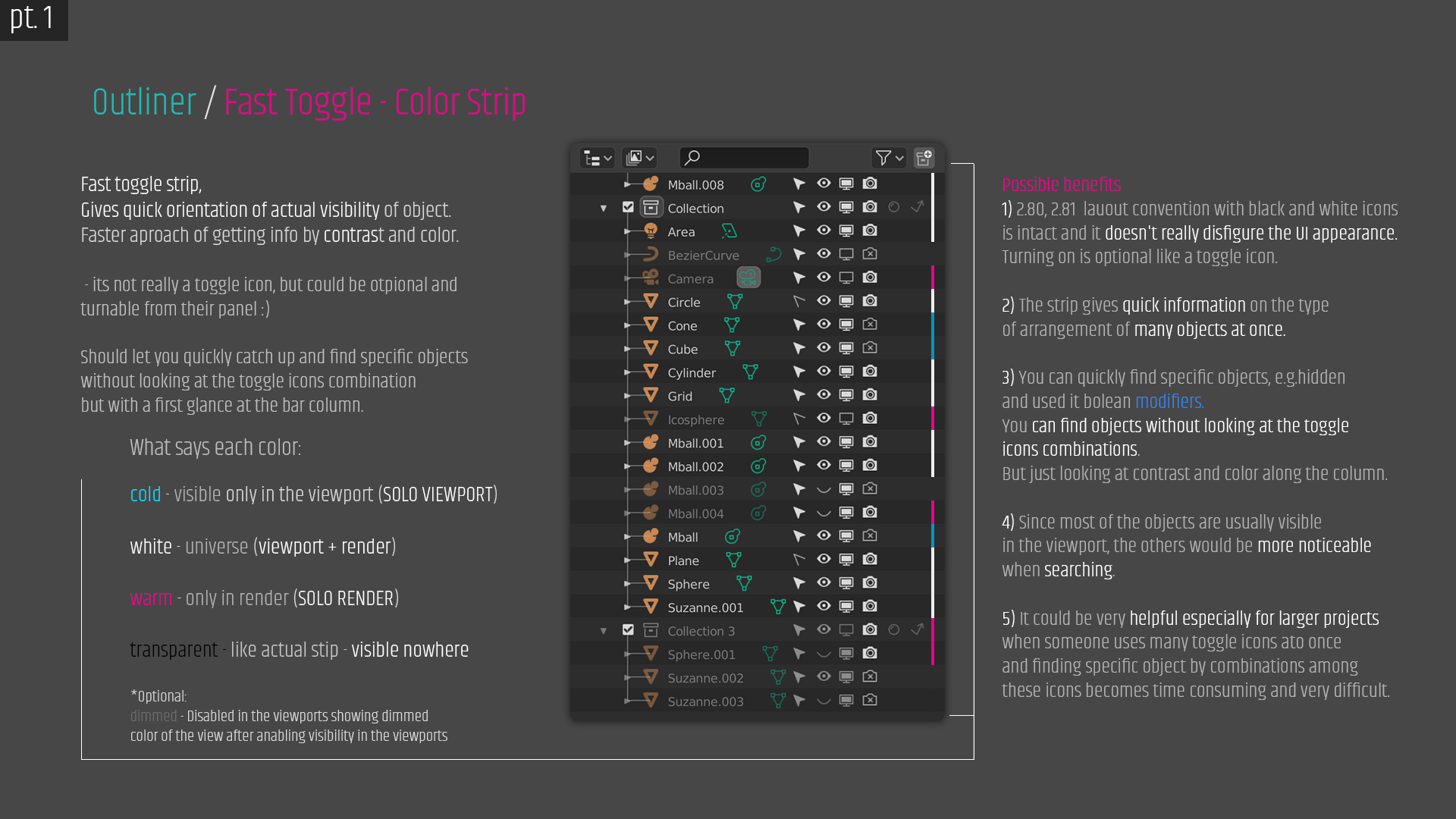
OUTLINER: View Color Strip. Shows quickly & clearly the visibility of objects in the Outliner! no more time consuming searches
Hey guys! This time something that significantly speeds up looking at the visibility of objects in Outliner. (Colors bellow are just for showing the oveal concept and idea so there's room for your creativity) Thanks to this you wouldn't have to look at the icon combinations in Outliner but you could see immediately through the Toggle Color Strip. This is a new approach to showing information about objects. Read the info on the graphic please :) I apologize for spelling errors :) Have a good time :)
6 Comments
Place of activation: {attachment Fast_toggle_color_strip__how_to_activate_png}
Really a nice idea. Maybe nicer color would make this proposal more appealing...
This plus entries (with icons) in right-click menu for setting visibility would be a good addition to outliner imho
* @ Lsscpp * Yeah and thanks :) I'll, write it in the top info :) I made those colors just for showing an overal concept and idea and called them like: warm, cold, etc. to leave room for the creativity of users and developers. Probably with each layout you could use colors in a slightly different style or just one with better apperance consistent with the rest of the UI but still giving enough contrast and color difference to be functional. :) By right click menu to set visibility you mean in this color strip or just a complementary Outliner feature? Sounds good!
* @jeremiasznm * rigth click on the object name would show all the visibility toggles (with icons). So that one could also live without icons in the outliner and relying on your idea for everyday use.
To make this more complete I think you should upgrade your mockup showing how to expose the options in the outliner filters popover
* @ Lsscpp * I think that color settings would be better done in the color settings in the properties panel as a separate outliner subgroup. Because if you try to fit these properties in a pop-up window, it may take more space than you want for this strip. Color strip could be set for a long time and in the pop-up there's space for things maybe more often adjusted than this would be.
There is also something like a drop-down button with colorful squares with different ready-made color variants, or several separate squares with selectable color. Unfortunately, it always takes up too much space only for the color strip options in the pop-up window.
Another argument for placing the color options in a standard way in the outliner color properties panel is that everything about UI colors is right there.
but ... if I come up with something new, I will supplement it. Unfortunately, I have a lot of work to do now.
And an alternative position: {attachment Fast_toggle_color_strip_pt_2png}