
Disable Proportinal Editing by pressing "O" once
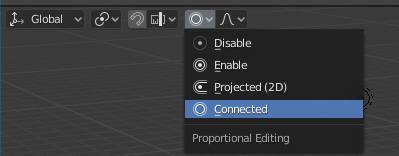
I don't know if it's a bug or not, but when I'm using proportional editing with "Connected" or "Projected 2D" option enabled, I need to press O twice to exit proportional editing. I don't understand why this behavior is useful, since we need to press O once to exit the proportional editing mode if we're not using "Connect" or "Projected 2D".
5 Comments
Agreed, have always found this strange as well.
yeah i always thought O should just be on off, and then you can tell it to be one type or the other and whenever you hit o it'll just turn that on and off
at least i made shortcut to switch between disable and connected (I use it usually)
Here the reason {attachment 150346jpg} toggle works between Enable and Disable. When mode is not Enable, it switches Enable at first. Then off
agree, it is strange behavior. The more annoying, O drops setting to default (Enable)