
Navigation GUI for compositing
I never use navigational gizmos in 3D viewport, but they would be useful in compositing.
I know there are V and Alt+V buttons to zoom in and out, but they are already occupied by other commands (there is a conflict between edytor types
developer.blender.org/T93403
).
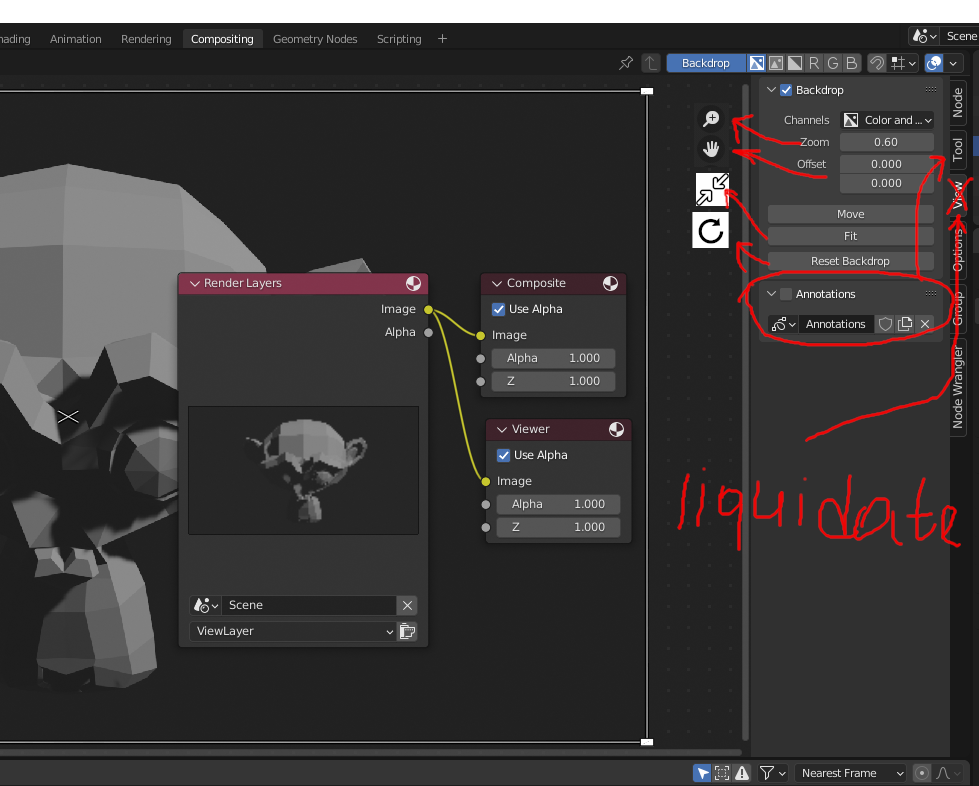
These changes would make the View tab unnecessary, and accessing these functions would make it much more convenient
3 Comments
Adding some navigation GUI would be nice. But removing the view tab?
We have gizmos to control the viewport and move objects around. Do you think we should get rig of object transform panels and view panels as well? And what about timelines and dope sheet? We can manage keys and transforms without them, so they are unnecessary, right? Same for nodes, we can control them from the Properties Editor and Shader Editor, so either one of these is unnecessary and should be removed?
Perhaps I overdid on the removal, but if the developers will add elements to manipulate - then this tab for me will be removed :)
The zoom and offset navigation control gizmos are not meant to move the backdrop image. For UI consistency, the zoom and pan gizmos should move the view around in the node space but leave the backdrop image where it is. New gizmos would need to be created to accomplish this goal properly. Currently, we don't even have the regular navigation gizmos in the node editors. Gizmos for the backdrop image controls is not a bad Idea. It just will take more work than you might think.