
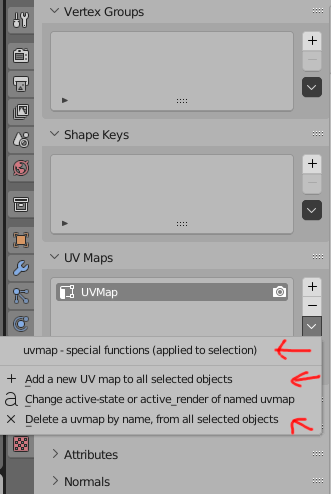
additional UV operators, for creating UV texture atlas and merged UVs
These operators are required for some workflows, such as ** texture atlas creation **
"merged" means: with multiple objects on one UV map of same name
.
for example: if i add 20 objects to the texture-atlas (UV map), i have to rename 20 uvmaps !! but with these operators, i can do one simple click . the same for deleting from atlas.
.
blender could have had - ultra useful multi UV editing functions - since 2021 already.
these functions have already been implemented AND commited !! , but were rejected, for unknown (invalid) reason:
here is the commit: archive.blender.org/developer/D13467
.
operators:
- add a UV map (of given name) to all selected objects
- change the "active" state for a named UV map, for all selected objects
- delete a UV map by name, from all selected objects
note: although all UV maps relate to one single object, if the maps have * the exact same name * , they can be edited almost as if they are a single one. this actually works without issues.
the image is a real screenshot of fully functional operators.
6 Comments
I have to do this at work for atlases for sometimes up to 100 meshes. Without this native functionality I use the zenUV addon for bulk manipulating UV maps: creation, names, view state, active state. In addition to your proposal I would add the option to move UV maps up or down a slot. There is an option to change sort order but it's a temporary state and not baked into the file and doesn't export.
IMHO being able to use the outliner for the last two operators would be more intuitive (or at least could be a nice additional way to do it).
The first one, shouldn't that be possbile by holding down Alt while clicking the + button?
thanks for commenting.
for example: if i add 20 objects to the texture-atlas (UV map), i have to rename 20 uvmaps !! but with these operators, i can do one simple click .
The Outliner's role is to handle data in bulk too. If we could filter out UV data on a selection of objects, you could easily do things like selecting a bunch of UVs across objects and bulk rename or delete.
anyway . if you want easy texture atlas creation, you better vote up .