
Input socket for Image Texture node
I'm working on an ambitious project that involves using Blender's tools and python to create a custom character builder. The goal with this is to be able to re-use assets and properties by just loading the same parameters where they are reusable. I so far was able to pull off transferring Vertex groups from separate objects to one combined object and same for Shape keys, but the current wall I have is trying to do the same with textures.
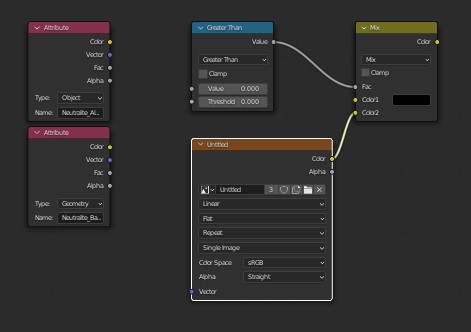
Currently, thanks to the attributes reading from the Object Custom properties, I am able to have unique data for every object that loads and thus set up the material accordingly. However, when it comes to the texture map, I had to come up with an unorthodox method to get the map I wanted, which involves creating a custom "switch case" ladder to load and overwrite the textures until I get the texture I want. Since the characters I'm building are made up of several combinations of different body parts, this would be extremely difficult to set up, when ideally, I could just have the image loaded by storing the location string or the image name in the Custom Properties and have it apply for each individual object.
Hopefully I'm not asking too much, but if I could just have an input socket for the image texture node to load images dynamically, that would really add a lot of utility and save me the trouble of making endless switch case ladders.
and I know it sounds a little unorthodox, but you can store blender's image data in a custom attribute using python and it recognizes the image as such. But the node does more to the object which is required to use it in this way. So if I could just feed that image object into the texture Node, Every object will have it's texture data loaded dynamically without needing to create a unique texture for every character.
Oh and while OSL would've been an option, I want to take advantage of my GPU for rendering these characters.
3 Comments
I don't know about anyone else, but this would help me out a LOT with so many things! Mostly involving making custom NodeGroups involving images.
i am so much agree with you. a lot of method because do not have this option make thing so hard to do or impossible
I created a workaround with a python plugins that adds a "Textures" tab to the material, where I can define named channels and assign images with the image dropdown.
I then made a sampler node that takes a Vector2-Input and Color-Output and has a dropdown for the named channel. When I swap out the texture in the named channel on the material, it swaps it out for all samplers referencing the channel.
With that I can at least "pass" a texture to a node group. It is implemented as a custom node group, so copy+pasting it crashes blender (shift+D duplicate works) but other than that it works great!
If anyone is interested in the plugin, let me know DISCLAIMER: The plugin is a 100% vibe coded pile of python, use at own risk