
MultiColor Mode for weight Painting
Hello everybody, As previously mentioned, I find that Blender is lacking a bit of quality when it comes to weight painting. I already submitted one idea to improve in this area: blender.community/c/rightclickselect/mYmR/
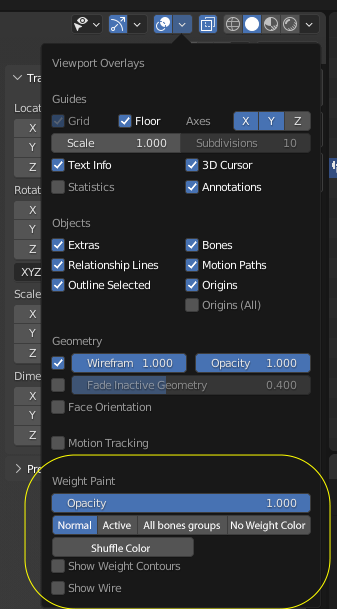
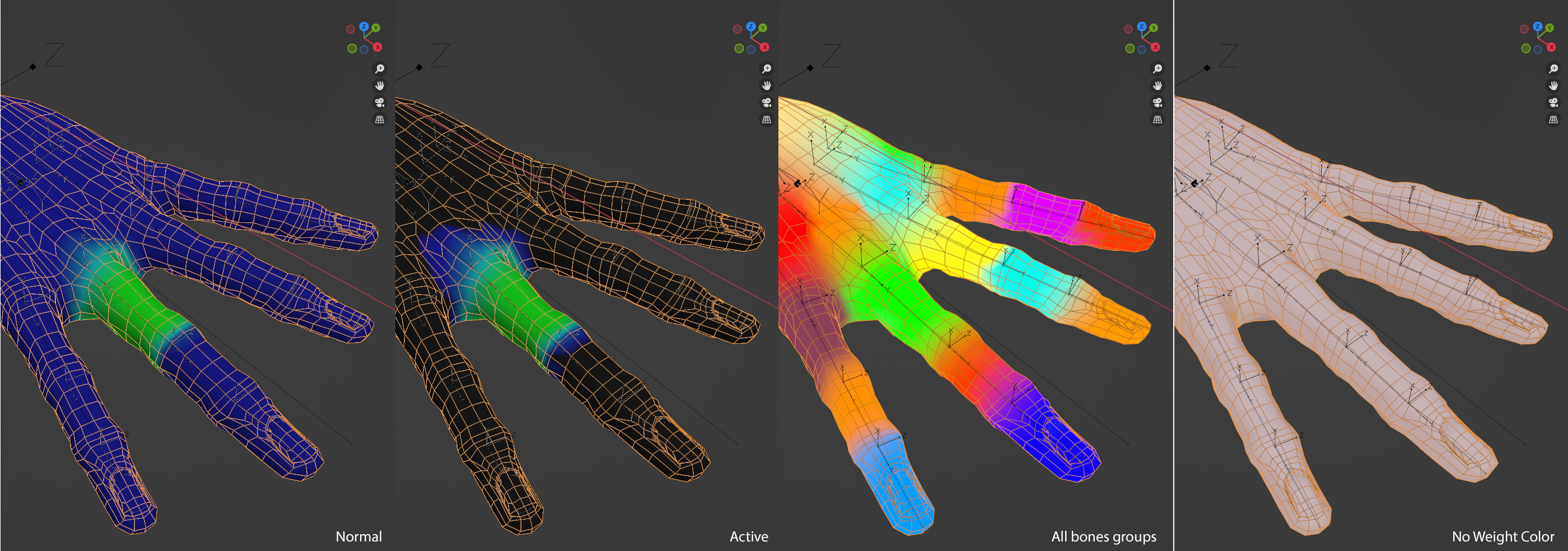
here is a second one: Adding a mode to see all bones group at once with a multicolor system. This mode would use something like 20 different colors assigning them randomly to different groups and using these colors to show how the bones are affecting the mesh. Sometimes, some bones would get the same color and when they are side to side, that would be difficult to see how they affect the mesh, and that's where a Shuffle Color button would be useful to see clearly what we are looking for. This mode is super useful to quickly see what needs work or where there is an obvious problem.
Also having a "No Weight Color" would be nice too. It's the same as putting the opacity at 0, but it's quicker to go back and force, because sometime it's nice to paint directly on the mesh without being distracted by the weight color.
I really hope that this one could be implemented, it is really useful! Thank you! Mathias.
1 Comment
Duplicate of/ referencing this blender.community/c/rightclickselect/X2bbbc